AI PPTX and PowerPoint translator
Translate an Entire PowerPoint File Online
Upload a PPTX and translate all editable slide text with context-aware AI. Keep the presentation structure, choose from 100+ languages, and check a free preview before you pay.
or drag and drop
PPTX only · Up to 50 MB
- Free preview before payment
- No sign-up required
- Auto-deleted after 14 days
- From $2.90 · no subscription
Start with a common PowerPoint translation
Choose a language pair to preselect it in the uploader, or select any of the supported languages yourself.
Real translated output
See the slide before and after translation
This Japanese company overview was translated into English while the two-column design, typography hierarchy, figures, and visual spacing stayed usable.
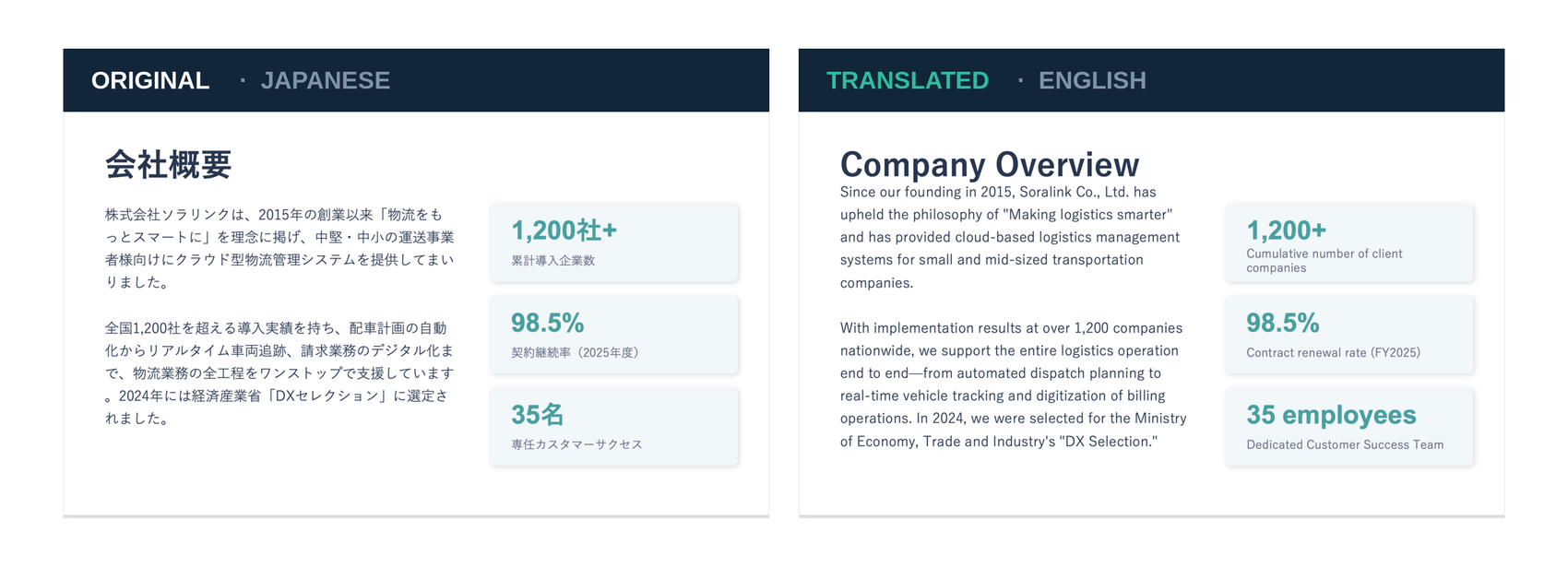
Text length changes between languages, so we recommend a quick visual review of line breaks and text boxes before presenting.
Translate the presentation, not one text box at a time
Doc2Lang works through the editable text in the PPTX package and returns a translated PowerPoint file instead of a page of copied text.
Slide text
Translate titles, body copy, labels, and other editable text across the deck.
Speaker notes
Text stored in standard PowerPoint speaker notes is included in the translation.
Charts and shapes
Editable labels in PowerPoint charts and shapes can be translated with the surrounding slide context.
PPTX structure
Slides, images, and presentation styling remain in the output file while editable text is replaced.
Need to translate several presentations in one job? Batch translate multiple PPTX files in a ZIP archive.
Whole-file workflow
How full-file PowerPoint translation compares
The difference is the output: Doc2Lang returns a translated PPTX instead of making you move text between tools one box at a time.
| Method | Workflow | Result | Speaker notes |
|---|---|---|---|
| Doc2Lang | Upload the complete PPTX once | Downloadable translated PPTX | Included when stored as standard notes |
| Manual PowerPoint translation | Select and replace text section by section | Original file edited manually | Handled separately |
| Plain text translator | Copy and paste text outside the deck | Translated text without the PPTX | Handled separately |
How to translate a PowerPoint in three steps
Go from the original deck to a downloadable translated PPTX without copying slides into a separate translator.
Upload and choose languages
Add a .pptx file, then select the presentation's source language and the language you need.
Review a free preview
Check a partial translation and see the exact quote before deciding whether to continue.
Pay once and download
Purchase the complete translation with no subscription, then download the translated PowerPoint file.
Built for complete decks
One workflow for the presentations people actually share
Translate a reusable PowerPoint file for the audience who needs it, while keeping the original deck as your source of truth.
Business presentations
Localize company profiles, investor decks, proposals, and internal updates.
Training and education
Translate course slides and speaker notes for multilingual teams or learners.
Sales and marketing
Adapt pitch decks and campaign presentations without rebuilding every slide.
PowerPoint Translation FAQ
Which PowerPoint format can I upload?
Upload a modern .pptx file. The legacy .ppt format is not supported; open it in Microsoft PowerPoint and save it as .pptx first.
Does it translate the whole PowerPoint presentation?
It processes editable text across the PPTX, including slide text, editable chart or shape labels, and standard speaker notes. You do not need to translate each text box manually.
Will the translated PowerPoint keep its layout?
The PPTX structure, slides, images, and styling remain in the output file. Because translated sentences can be longer or shorter, review text wrapping and crowded text boxes before presenting.
Is the PowerPoint translation free?
You can view a partial translation preview for free. The complete translated PPTX is available after a one-time payment; no subscription is required.
How much does a PPTX translation cost?
Pricing depends on the amount of text and the translation option you choose. Guest plans currently start at $2.90 for Lite and $5 for Pro. You see the quote before paying.
How long is my PowerPoint file stored?
Files are automatically deleted after 14 days. You can also delete them manually sooner from the file page.
Does it translate text inside slide images?
No. Text that is part of an image is not editable PowerPoint text and is not translated. Replace important image text with a PowerPoint text box before uploading.
Related Services
Explore other translation services that might interest you
Start Translating Your PowerPoint Presentation
Upload a PPTX and inspect the translated preview before you decide to pay.