Translate EPUB eBooks Online with AI
Doc2Lang uses GPT-based AI to translate complete EPUB books while keeping every chapter, style and image exactly where it belongs. Upload a file, check a free preview and download a fully formatted edition in another language within minutes.
or drag and drop
EPUB only · up to 50 MB
No software to install and no chapter-by-chapter copy and paste. The translated eBook opens in Kindle, Kobo, Apple Books and any other EPUB reader, with the table of contents still in place.
See a Real EPUB Translation
We translated O. Henry's classic "The Gift of the Magi" from English into Spanish with the Lite model, without any manual editing. Look at the screenshots, or download both eBooks and compare them on your own reader.
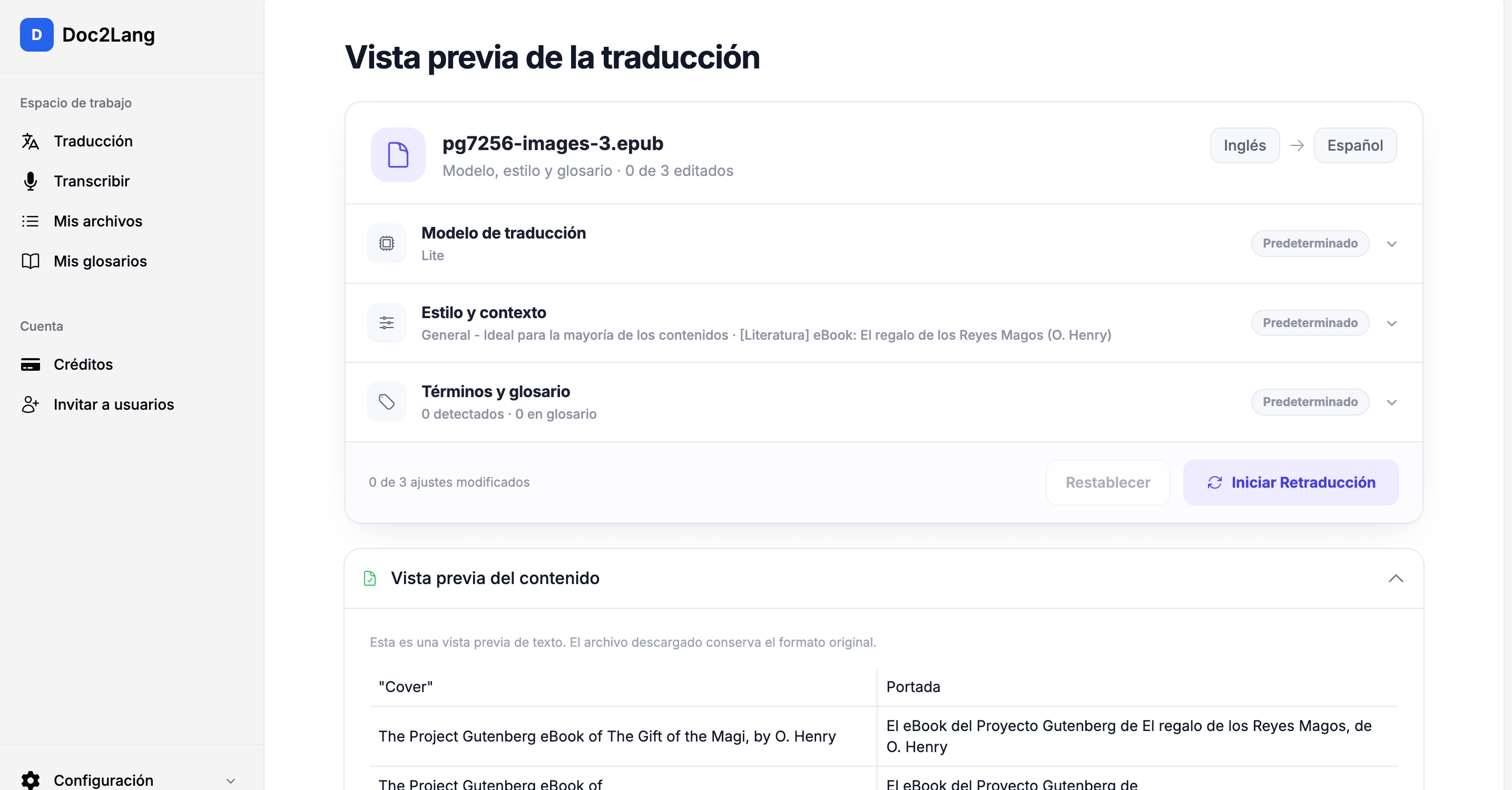
Check the preview before you pay
The free preview shows the original and the translated text side by side, so you can judge tone, names and terminology before starting the full translation.
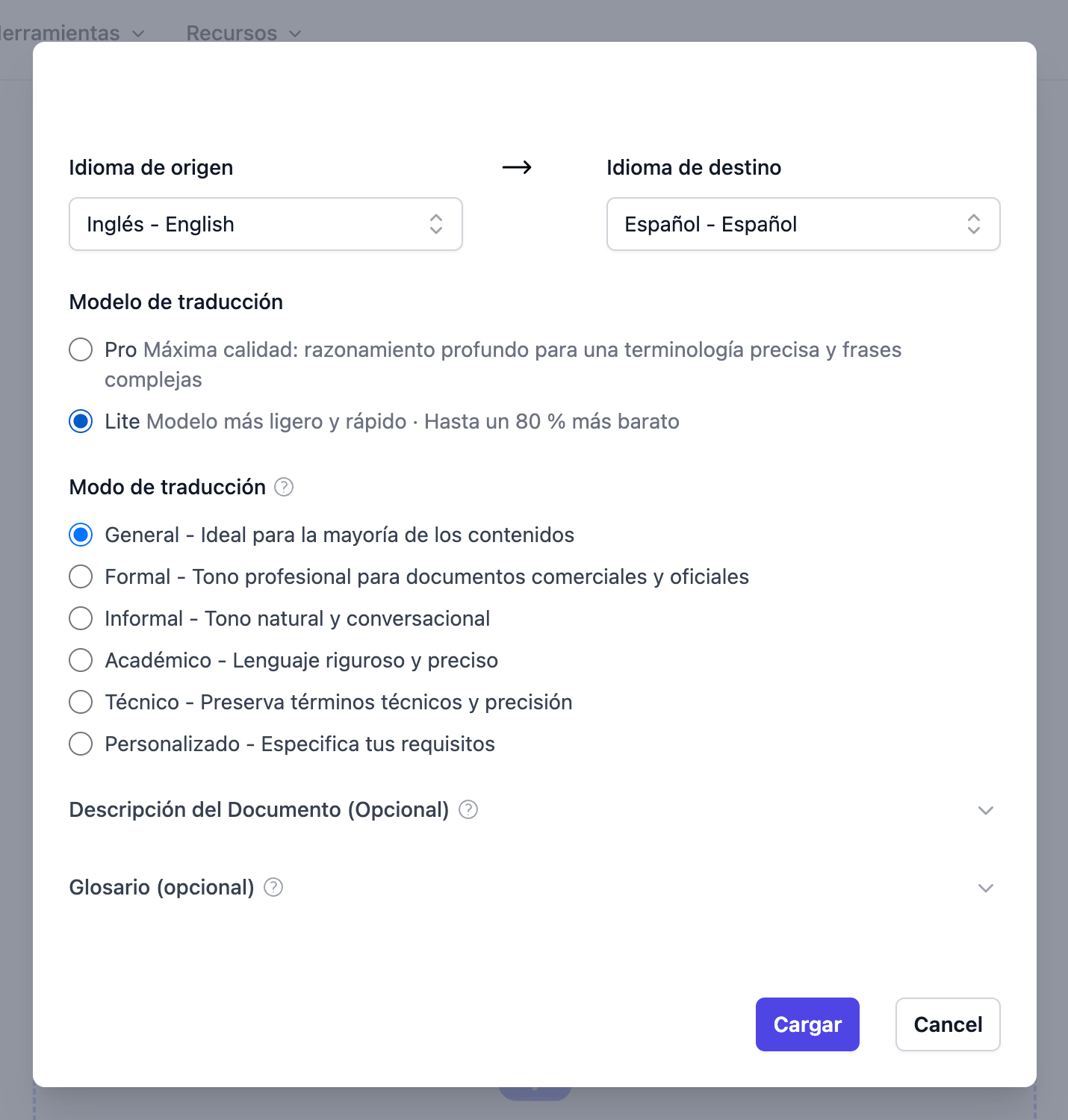
Pick languages, model and style
Choose the source and target language from more than one hundred options, select the Lite or Pro translation model and set the style that matches your book.
Sample book: "The Gift of the Magi" by O. Henry (public domain), translated into Spanish with the Lite model and published here without manual corrections.
Why Choose Doc2Lang for EPUB Translation
GPT Language Engine
Large language models translate with context, idioms and terminology in mind, so a novel reads like a novel and a textbook stays precise. Chapters keep a consistent tone from the first page to the last.
Table of Contents Retained
toc.ncx and content.opf are synchronised automatically. Every chapter link, bookmark and footnote reference still lands in the right place after translation.
More Than 100 Languages
Translate between more than one hundred source and target languages and publish global editions of the same book without rebuilding it for each market.
Works on Every Reader
The translated EPUB keeps its book structure and opens on Kindle, Kobo and Apple Books. Need MOBI, AZW3, KFX or FB2? Convert the finished EPUB with the free Calibre app in one step.
Translate Your EPUB in Three Steps
Upload your EPUB
Drag and drop an .epub file of up to fifty megabytes. Have a MOBI, AZW3, KFX or FB2 book instead? Convert it to EPUB with the free Calibre app first, then upload it.
Choose languages and preview
Pick the source and target language from more than one hundred options and check a free translated sample before paying anything. The exact price is shown up front and billed per character.
Download the translated eBook
Download the finished EPUB in minutes and open it directly on Kindle, Kobo or Apple Books. The table of contents, images and styles are right where you left them.
Know Before You Upload
A few clear limits help you get the result you expect on the first try.
What is the maximum EPUB file size?
We recommend fifty megabytes or less per EPUB. Very large books are best split into volumes before upload.
Can you translate text inside images in an EPUB?
Not yet. Text embedded in images and covers is kept as is. If image text matters for your book, use our PDF OCR mode or contact us for a custom service.
Can I upload Kindle AZW3 or MOBI files?
Not directly. Convert AZW3, MOBI or KFX to EPUB with the free Calibre app first, then upload the EPUB. You can convert the translated result back the same way.
May I translate copyrighted eBooks?
Only upload books you wrote, own the rights to, or have permission to translate. Public domain works are always fine.
Who Translates eBooks with Doc2Lang
Independent Authors
Publish your novel or non-fiction book in new markets without paying agency rates for a first draft. Translate with AI, have a native speaker proofread the result and release a new edition in a fraction of the usual time.
Publishers and Educators
Batch translate course books and teaching material while citations and footnotes stay linked. Evaluate foreign titles quickly before committing to a full professional translation.
Readers, Libraries and Archives
Read public domain classics and research material in your own language, and make multilingual collections accessible to every visitor.
EPUB Translation FAQ
Does the translated EPUB keep the table of contents?
Yes. We synchronise toc.ncx and content.opf during translation, so every chapter link and bookmark keeps working in the translated book.
How much does an EPUB translation cost?
You pay per character of the source book. The exact quote appears after upload and the preview is free. Guest minimums are $2.90 for Lite and $5 for Pro, with no subscription required.
Does EPUB translation change CSS, fonts or layout?
No. Only the text nodes are translated. Style sheets, embedded fonts, images and the overall structure of the EPUB stay untouched.
Who owns the translated EPUB?
You do. All rights stay with you as the copyright holder; Doc2Lang only holds temporary permission to process the file. You can delete it at any time, and files left behind are removed automatically after 14 days.
How long does an EPUB translation take?
A complete book usually finishes within a few minutes. You can watch the progress in the browser or leave an email address to get notified when it is done.
Which languages does the EPUB translator support?
More than one hundred languages, including English, Spanish, Portuguese, French, German, Italian, Japanese, Korean and Chinese, in any source and target combination.
Can I translate an EPUB for free?
The translated preview is free for every file, so you can check the quality before paying. The full book is billed per character after you approve the sample.
How do I read the translated EPUB on my Kindle?
Send the translated EPUB to your device with Amazon's Send to Kindle, or convert it to your preferred format with Calibre. Kindle, Kobo and Apple Books all accept the file.
Related Services
Explore other translation services that might interest you
Translate Your First eBook Now
Upload an EPUB, check the free preview and download a fully formatted translation in minutes.