Complete PDF translation · Text and scanned files supported
PDF Translator — Keep the Original Layout, Images, and Tables
Upload your PDF, get an accurate translation in PDF format — layout preserved, OCR included.
or drag and drop
PDF files only
- Free preview without signup; pay only for the full translation
- Automatic OCR for scanned PDFs
- Files auto-delete after 14 days, or delete them sooner
- Lite from $2.90, Pro from $5
Real PDF Translation Example
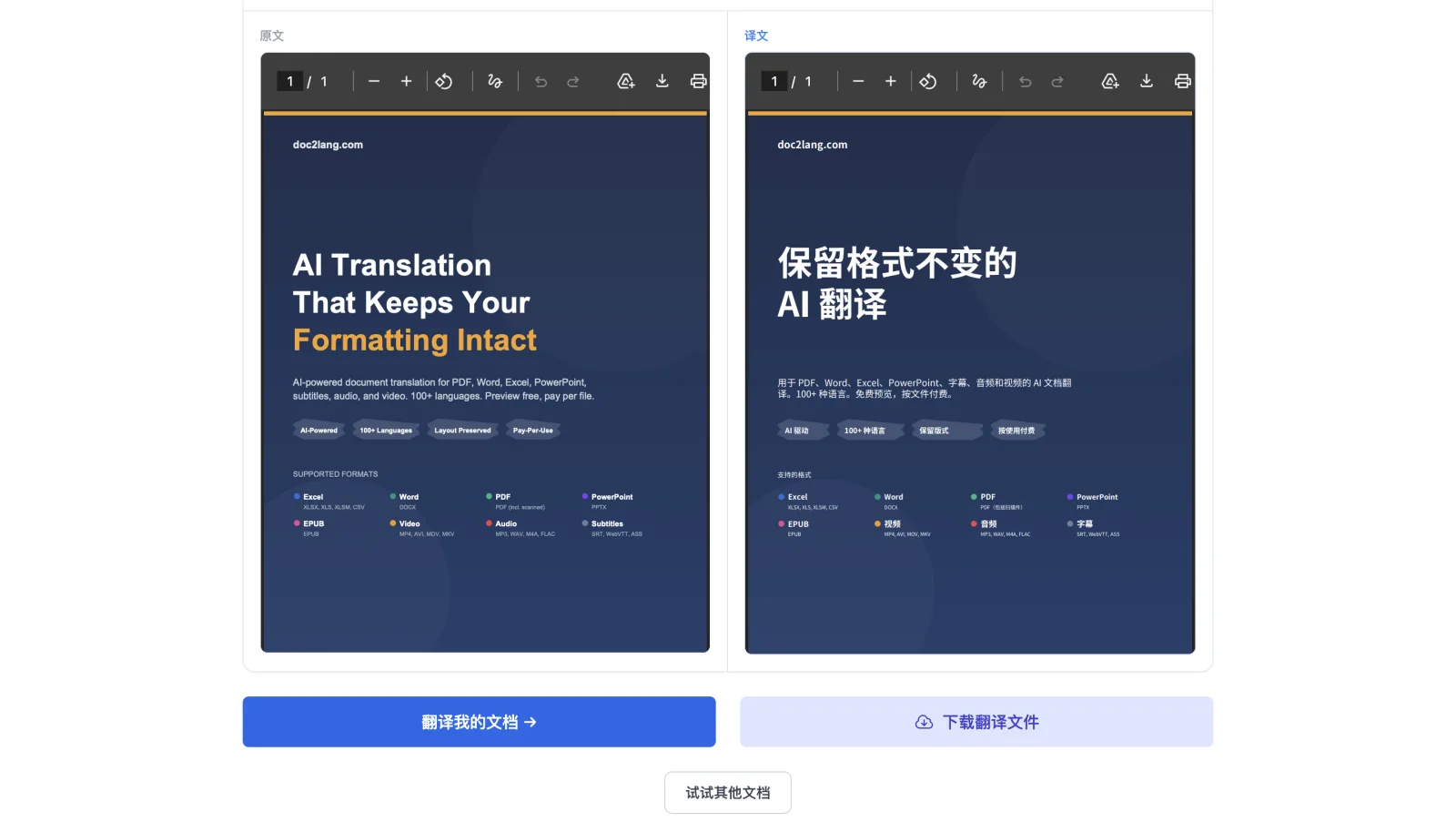
Product cover translated from English to Chinese
- Large display typography reflowed for Chinese without covering other elements
- Dark background, accent colors, badges, and colored bullets retained
- The original and actual translated PDF are available to inspect
English → Chinese · 1-page native-text PDF · Actual demo output
Popular PDF translation tasks
Choose a language direction to preselect the uploader, or let Doc2Lang detect the source language.
Not sure which language the PDF uses? Choose automatic source-language detection.
The right workflow for your PDF, with usable files at the end
Doc2Lang selects the processing path based on the document, then provides versions for reading, reuse, or review.
Two processing paths
Text PDF: read and translate the text layer
Existing text and positions are read directly, translated with context, and placed back on the page without unnecessary OCR errors.
Scanned PDF: OCR first, then translate
Pages without a reliable text layer are recognized from the image before translation and layout reconstruction; low-quality scans should be reviewed.
Download three PDF versions
Available versions appear on the results page so you can choose what fits your task.
Background-preserved PDF
Keeps images, backgrounds, and the overall page design while replacing the text.
Text-only PDF
Removes decorative backgrounds and keeps the translated text in a clean layout.
Bilingual PDF
Alternates original and translated pages for comparison and proofreading.
Live Demo · 1:30
See How Doc2Lang Translates a PDF in 90 Seconds
Translated document: our own "AI Translation That Keeps Your Formatting Intact" landing page. We put our claim through our own pipeline.
From upload to download in three steps
Check your own file, preview, and price before deciding whether to buy the complete translation.
- 1
Upload the PDF and choose languages
Upload a text or scanned PDF and choose source and target languages, or use automatic source detection.
- 2
Review the free preview and quote
Doc2Lang analyzes the file and creates a preview so you can check translation and layout before paying.
- 3
Purchase and download the translated PDF
After approval, purchase at the quoted price. Processing continues in the background and you receive an email when it is ready.
Lite
For everyday reading and standard files
$2.90minimum price
A lower-cost option for ordinary PDFs. Savings on scanned or complex pages depend on the file contents.
Pro
For professional and complex documents
$5minimum price
Stronger translation and recognition for terminology-heavy, scanned, or layout-complex PDFs.
These are minimum prices. The exact cost is shown after the PDF is analyzed; no subscription is required. View full pricing details
Your Documents Stay Private
Three layers of protection, by default
Delete Anytime
Remove your files from our servers with one click after translation.
Protected API Processing
Translation content is processed through APIs and is not used to train public models; provider API data policies apply.
Encrypted HTTPS Transfer
Every upload and download is encrypted with industry-standard TLS.
Preview first, then decide whether the result is ready to use
Text length, font coverage, and internal PDF structure vary by language, so results are not guaranteed to match pixel for pixel. Low-quality scans, complex handwriting, and legal, medical, or financial documents should be reviewed by a qualified person.
Frequently Asked Questions
What types of PDF files do you support?
What format is the translated file, and what versions do I receive?
How accurate is the translation?
Is the original layout and formatting preserved?
Which languages are supported?
How does pricing work? Do I need a subscription?
Is my document kept private and secure?
Who owns the translated document?
How long does translation take, and what's the process?
Which PDF tool do you actually need?
This page translates a complete PDF and creates a translated PDF. Choose a more focused tool if your task is different.
Extract text from a PDF
Use PDF to Text when you only need copyable text and do not need translation or layout preservation.
Translate an image or screenshot
Use the OCR Translator when the source is an image rather than a complete PDF.
Translate a research paper
Use the Paper Translator for academic reading, terminology, and research workflows.
Want to inspect the layout workflow and a real result first?
Read how layout preservation works or inspect the complete case study before uploading your own file.
Related Services
Explore other translation services that might interest you
Ready to translate your PDF?
Upload your file and preview the translation for free — no signup needed.