Translate PDFs with Doc2Lang
Layout-Preserving Translation with Free Preview
Have you ever had these experiences when trying to translate an English PDF into Japanese?
- -Copy-pasting text from a PDF scrambled the column layout, making the content a mess
- -The translation worked, but it took hours to reconstruct the original layout
- -Tables and page numbers got mixed into the translated text, making data unrecognizable
Doc2Lang was built to solve these PDF translation layout problems. Simply upload your PDF, and it translates while preserving the original formatting, outputting directly as PDF.
In this article, we demonstrate by translating a WTO (World Trade Organization) English PDF into Japanese with Doc2Lang, showcasing translation accuracy and layout reproduction.
Why Is PDF Translation So Difficult?
PDF is a file format designed to faithfully reproduce on-screen appearance. While convenient for reading, it creates numerous challenges when you try to translate it.
Column text gets mixed together
When you copy a two-column layout, the left and right columns alternate line by line, making it impossible for translation engines to parse correctly.
Decorations and page numbers creep in
Chapter numbers, dot leaders, and page numbers get mixed into the body text, producing unnatural translation results.
Reconstruction after translation is painful
Even if the translation succeeds, reconstructing the original layout as a PDF requires manual work in design software.
In other words, what a PDF translation tool truly needs is not just translation accuracy. The key question is: can it translate without breaking the layout and output directly as PDF?
Doc2Lang was developed precisely to solve this challenge.
Hands-On: Translating a WTO English PDF with Doc2Lang
The Source Document
We used the table of contents (CONTENTS) page from a WTO English publication.
This PDF contains all the elements that make PDF translation difficult.
- 2-column layout: Chapter 1-2 on the left, Chapter 3-4 on the right
- Chapter headings with colored backgrounds
- Dot leaders aligned with page numbers
- Indented sub-items (e.g., subsections of Section 9)
- Hierarchical structure with 4 chapters and 11+ sections
Attempting to copy-paste and translate this would mix left and right columns together, producing unreadable results. It's the perfect material for testing a PDF translation tool's capabilities.
Translation Steps
Doc2Lang works in just 3 simple steps.
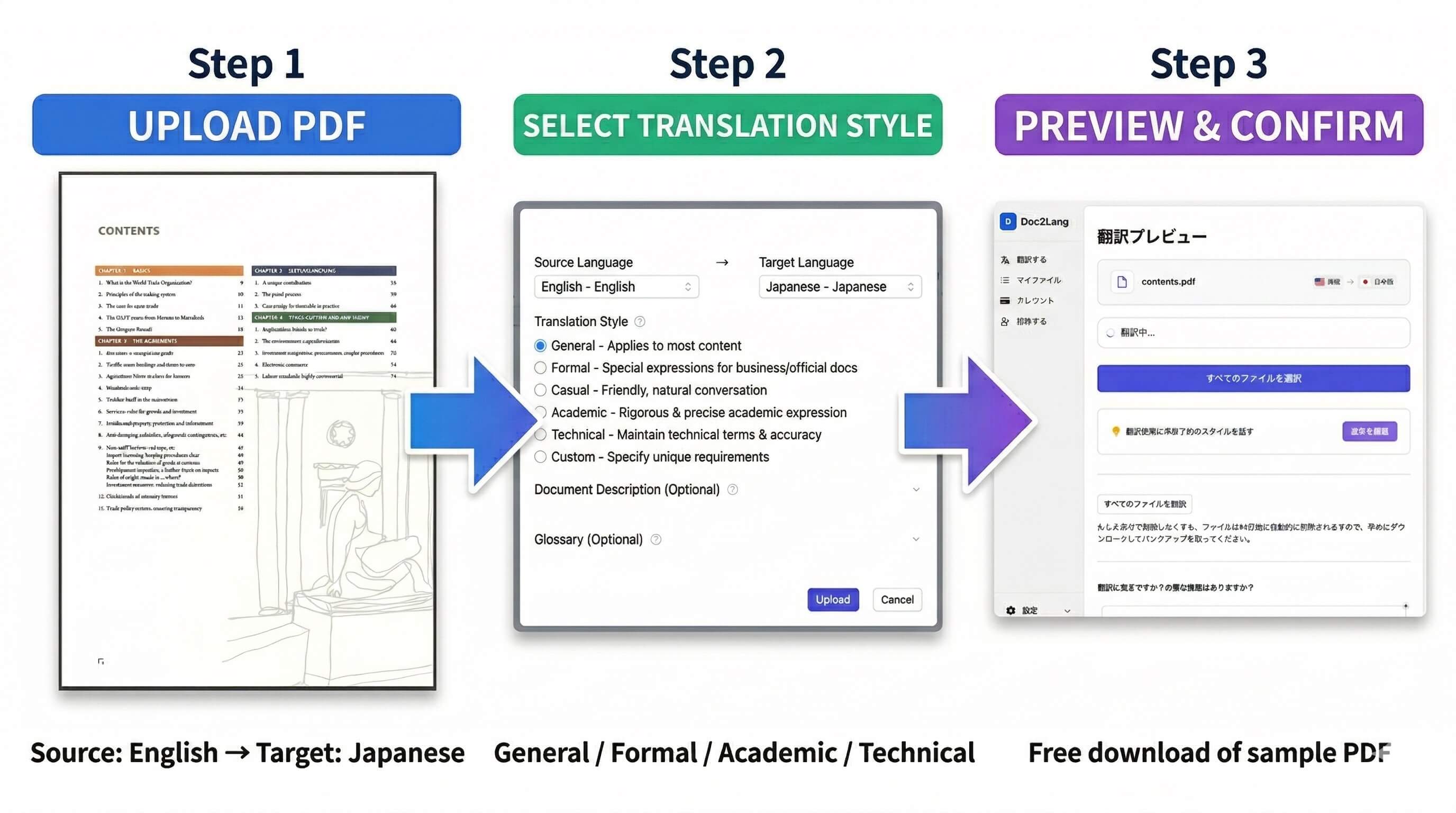
Upload PDF and set languages
Visit Doc2Lang and upload the PDF you want to translate. Simply set the source language to English and the target language to Japanese.
Select translation style
Doc2Lang lets you choose a translation style to match your document's purpose.
- General:Suitable for most content
- Formal:Professional expressions for business and official documents
- Casual:Natural, friendly conversational tone
- Academic:Precise and rigorous academic expressions
- Technical:Maintains technical terminology and accuracy
- Custom:Specify your own requirements
We chose "General" for this test. You can also register specialized terms in the glossary to ensure consistent translations of specific terminology.
Check results with free preview
After translation, download a preview PDF for free via "Sample File Download." You can verify quality before deciding to get the full translated file.
A Detailed Look at the Results
Full Comparison: Every Item Corresponds
When we align every item from the original and translation, the layout reproduction becomes even clearer.
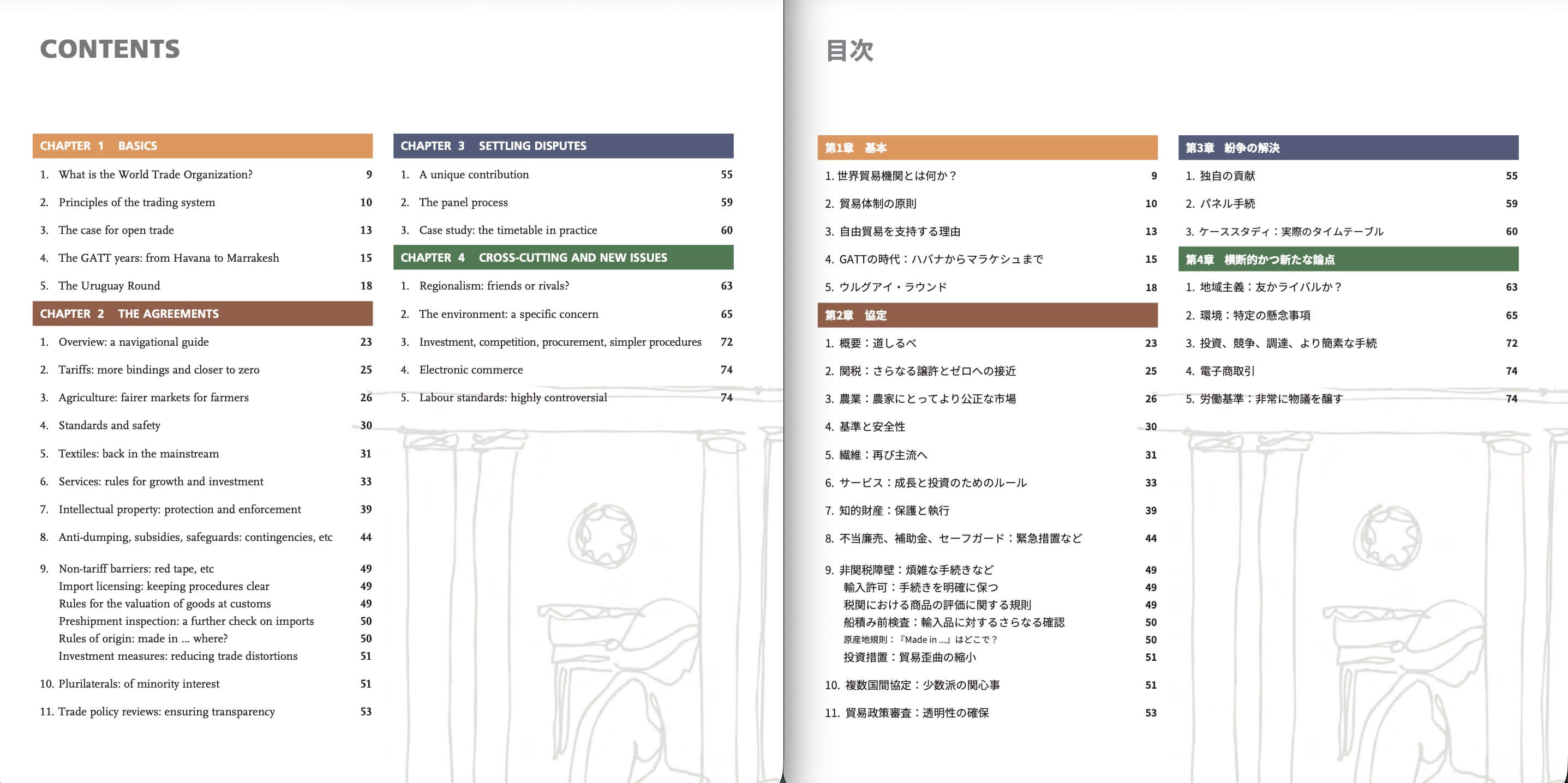
From Chapter 1 'The Basics' to Chapter 4 'Cross-cutting and New Issues,' all 4 chapters and 11 sections are accurately translated, with page numbers and sub-item indentation matching the original perfectly. The 2-column layout and chapter heading background colors (green, brown, auburn) are fully preserved—the translated PDF is ready to use as-is.
Layout Reproduction Highlights
A closer look at the translated PDF reveals 5 key points Doc2Lang reproduces.
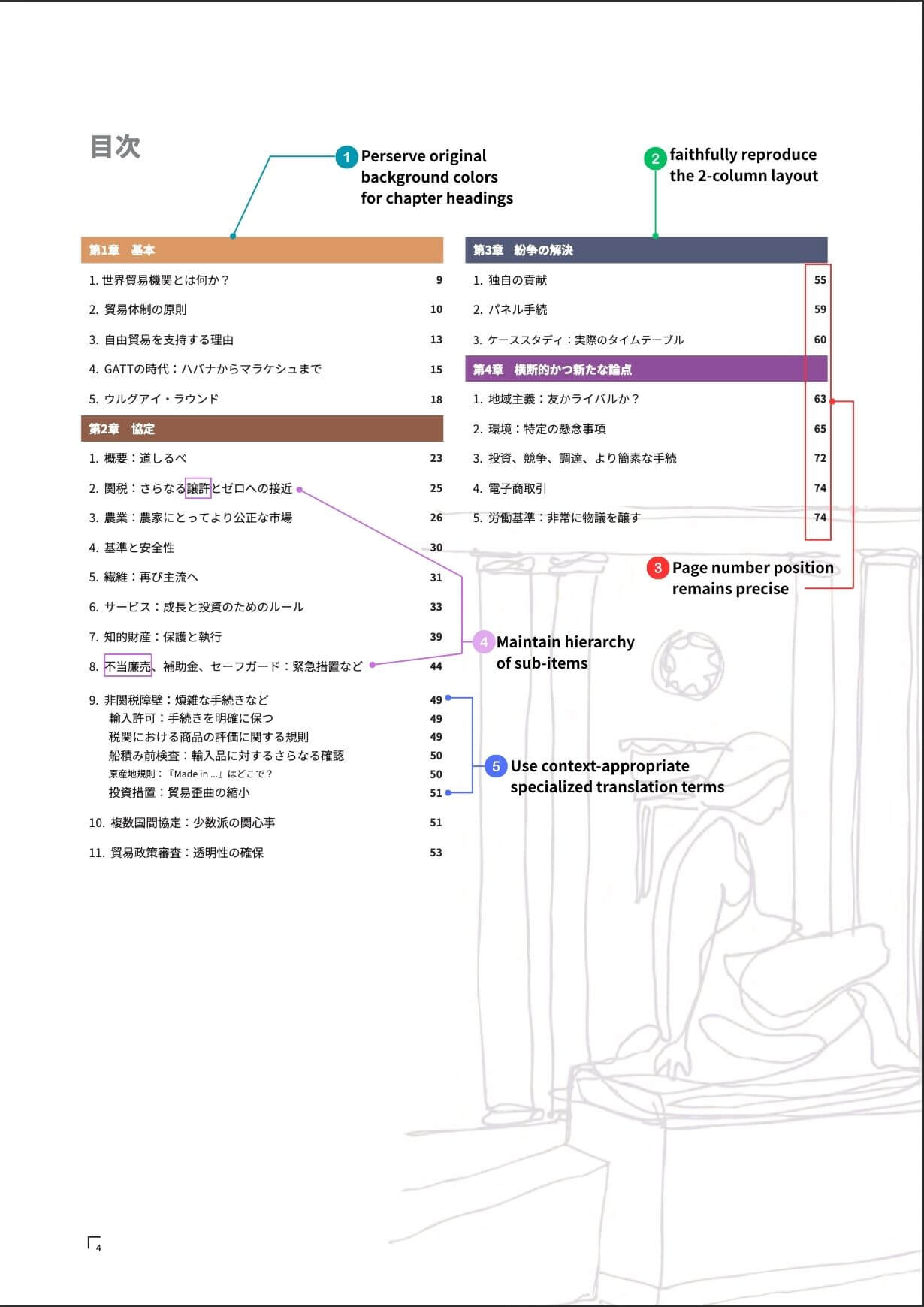
1. Chapter heading background colors preserved
The green bar for Chapter 1 'The Basics,' the brown bar for Chapter 3 'Dispute Settlement'—all background colors used in the original chapter headings are faithfully reproduced.
2. Two-column layout faithfully reproduced
The two-column structure remains intact, with translation output matching the original's exact positioning.
3. Page numbers stay in position
Page numbers (9, 10, 13...) positioned at the right edge of each item remain accurately placed.
4. Sub-item hierarchy maintained
Sub-items under Section 9 like 'Import licensing,' 'Valuation of goods at customs,' and 'Rules of origin' are translated with proper indentation preserved.
5. Context-appropriate terminology used
Terms like 'bindings' translated as '譲許' and 'Anti-dumping' as '不当廉売'—specialized WTO/international trade terminology is correctly chosen.
Translation Accuracy: Comparing Original and Translation
Let's compare each item's translation side by side with the original.
| Original (English) | Doc2Lang Translation (Japanese) |
|---|---|
| What is the World Trade Organization? | 世界貿易機関とは何か? |
| Principles of the trading system | 貿易体制の原則 |
| The case for open trade | 自由貿易を支持する理由 |
| The GATT years: from Havana to Marrakesh | GATTの時代:ハバナからマラケシュまで |
| The Uruguay Round | ウルグアイ・ラウンド |
| Tariffs: more bindings and closer to zero | 関税:さらなる譲許とゼロへの接近 |
| Agriculture: fairer markets for farmers | 農業:農家にとってより公正な市場 |
| Services: rules for growth and investment | サービス:成長と投資のためのルール |
| Intellectual property: protection and enforcement | 知的財産:保護と執行 |
| Anti-dumping, subsidies, safeguards: contingencies, etc | 不当廉売、補助金、セーフガード:緊急措置など |
| Non-tariff barriers: red tape, etc | 非関税障壁:煩雑な手続きなど |
| Import licensing: keeping procedures clear | 輸入許可:手続きを明確に保つ |
| Rules of origin: made in ... where? | 原産地規則:『Made in ...』はどこで? |
| Preshipment inspection: a further check on imports | 船積み前検査:輸入品に対するさらなる確認 |
| A unique contribution | 独自の貢献 |
| Regionalism: friends or rivals? | 地域主義:友かライバルか? |
| The environment: a specific concern | 環境:特定の懸念事項 |
| Labour standards: highly controversial | 労働基準:非常に物議を醸す |
Accurate specialized terminology
'bindings' is translated as '譲許' and 'Anti-dumping' as '不当廉売'—these are standard translations in the WTO/international trade field. Where typical translations might resort to katakana transliterations like 'バインディング' or '反ダンピング,' Doc2Lang selects context-appropriate terms.
Natural Japanese capturing meaning
'red tape' becomes '煩雑な手続き' and 'The case for open trade' becomes '自由貿易を支持する理由'—rather than literal translations, the output reads naturally in Japanese.
Strategic retention of English terms
For 'made in ... where?,' the 'Made in' is deliberately kept in English: '「Made in ...」はどこで?'. This expression is familiar to Japanese readers, making it clearer than a forced translation.
PDFs Where Doc2Lang Excels
Doc2Lang is particularly powerful for translating the following types of PDFs.
Academic Papers & Research Reports
Papers with complex structures including two-column layouts, footnotes, and reference lists can be translated while preserving structure. Choose the 'Academic' style for rigorous scholarly expression.
Business Documents & Contracts
Legal documents where clause numbering and bullet point hierarchy matter can be translated with layout intact. The 'Formal' style ensures business-appropriate language.
Technical Manuals & Specifications
Translates without disrupting figure numbers, tables, or procedure number positioning. Use the glossary to unify internal terminology and product names.
International & Government Agency Reports
Like this WTO document, Doc2Lang handles public documents with complex columns and formatting that copy-paste translation cannot manage.
How to Use Free Preview
Doc2Lang lets you download a sample translation file for free.
The preview version includes a watermark, but you can fully verify translation quality and layout reproduction. In our WTO table of contents test, the preview already confirmed faithful layout reproduction and accurate terminology.
You can verify quality before purchasing the full translated file, making it risk-free even for first-time PDF translation tool users.
Summary
The biggest challenge in PDF translation is not just accuracy—it's layout reproduction. Columns, tables, heading decorations, page numbers—whether a tool can translate without breaking these and output as PDF is the true measure of a PDF translation tool.
In our WTO table of contents PDF test, we confirmed the following results.
- Two-column layout and colored headings were faithfully reproduced
- Specialized terms like '譲許' and '不当廉売' were accurately translated
- Natural Japanese was produced, like 'red tape → 煩雑な手続き'
- Quality could be verified in advance with the free preview
Try Doc2Lang's translation quality with your own English PDF.
Ready to try PDF translation with Doc2Lang?
Experience high-precision PDF translation that preserves your layout