How to Translate ASS/SSA Subtitle Files
Without Losing Styles and Formatting
If you've ever worked with ASS (Advanced SubStation Alpha) subtitles, you know they're far more than plain text with timestamps. ASS files carry fonts, colors, positioning, karaoke effects, motion animations, and layered typesetting — the kind of rich styling that makes anime fansubs, music videos, and professional localizations look polished.
The core problem
Translating an ASS file almost always destroys that styling. Paste the contents into Google Translate or ChatGPT, and you'll get back a mess of broken tags, mismatched timecodes, and garbled formatting. Convert to SRT first, and you lose every visual effect the typesetter spent hours building.
This guide explains why ASS translation is uniquely difficult, what breaks when you use the wrong tools, and how to translate your .ass or .ssa files while keeping every style, tag, and karaoke marker intact. We'll demonstrate with a real example — translating the subtitles of Sintel, a Creative Commons animated film by the Blender Foundation, from English to Japanese.
What Makes ASS/SSA Different from SRT
An SRT file is plain text: a sequence number, a timestamp, and the dialogue. An ASS file, by contrast, is a full scripting format with three distinct sections:
[Script Info]
Defines the canvas resolution (PlayResX, PlayResY), script type version, and wrap style. These values affect how every line of text is rendered.
[V4+ Styles]
Where the visual design lives. Each named style specifies a font, size, primary/secondary/outline/shadow colors (in &HAABBGGRR hex format), bold/italic flags, scale, spacing, rotation angle, border width, shadow depth, alignment, and margins. A single ASS file might define dozens of styles: one for regular dialogue, one for signs, one for song lyrics, one for narrator voice.
[Events]
Contains the actual dialogue lines, each referencing a style by name. Within the dialogue text, override tags enclosed in {} can modify any style property on the fly:
| Tag | Function |
|---|---|
| \pos(x,y) | Precise positioning |
| \move(x1,y1,x2,y2) | Position animation |
| \c&H0000FF& | Change text color mid-line |
| \fad(500,500) | Fade-in/fade-out effects |
| \k45 | Karaoke syllable timing |
| \clip() | Masking regions |
| \t() | Animated style transitions |
| \p1 | Vector drawing mode |
| \an8 | Alignment overrides |
| \frz30 | Text rotation |
| \b1, \i1 | Bold and italic toggles |
When a translator replaces the dialogue text, every one of these tags must survive untouched. If a \k tag shifts by even one character position, the karaoke timing breaks. If a \pos tag gets deleted, the sign translation floats to the wrong corner of the screen. If curly brackets get mangled, the entire line may fail to render. The core challenge: extract only the human-readable text, translate it, and re-inject it into the exact same tag structure — without touching anything else.
Why Common Translation Methods Break ASS Files
Copying into Google Translate or ChatGPT
The most common approach — and the one that fails most often. When you paste raw ASS dialogue into a general-purpose translator, several things go wrong:
- Override tags get translated. A tag like \fnArial (set font to Arial) might get "translated" into nonsense because the engine treats it as text.
- Curly brackets get removed or doubled. Many translators strip special characters or reformat them.
- Line breaks change. ASS uses \N for hard line breaks and \n for soft wraps. Translators often convert these to actual newlines, destroying the intended layout.
- Line count changes. If the translator merges or splits lines, the one-to-one mapping between original and translated dialogue is lost, and timestamps no longer match.
- Character encoding breaks. ASS files use specific encodings per style. A translator that outputs in a different encoding can produce garbled characters when the file is loaded in a player.
Converting to SRT First, Then Translating
Some people convert ASS to SRT, translate the simpler format, then convert back. This is cleaner, but you lose everything that makes ASS worth using:
- -All style definitions are stripped
- -Positioning and motion effects disappear
- -Karaoke timing is discarded
- -Layer ordering (for overlapping text) is flattened
- -Vector drawings are removed entirely
If your ASS file is plain dialogue with no special effects, this might be acceptable. But if someone invested time in typesetting — and they usually have — you're throwing away that work.
Using Subtitle Edit or Aegisub Manually
Aegisub is the gold-standard editor for ASS files. You can absolutely translate line by line in Aegisub, preserving all formatting. The downside is obvious: it's manual work. For a 24-episode anime series with 300+ lines per episode, you're looking at days of tedious copy-paste-translate cycles. And if you're not fluent in the target language, you still need a machine translation engine — bringing you back to the tag-preservation problem.
Real-World Demo: Translating Sintel from English to Japanese
To show what proper ASS translation looks like in practice, we translated the subtitles of Sintel (a Creative Commons film by the Blender Foundation) from English to Japanese using Doc2Lang. The ASS file includes 8 different styles, karaoke lyrics, positioned signs, multi-layer effects, inline color changes, and more. Here are the before-and-after results:
Title Card — Multi-Layer Glow Effect
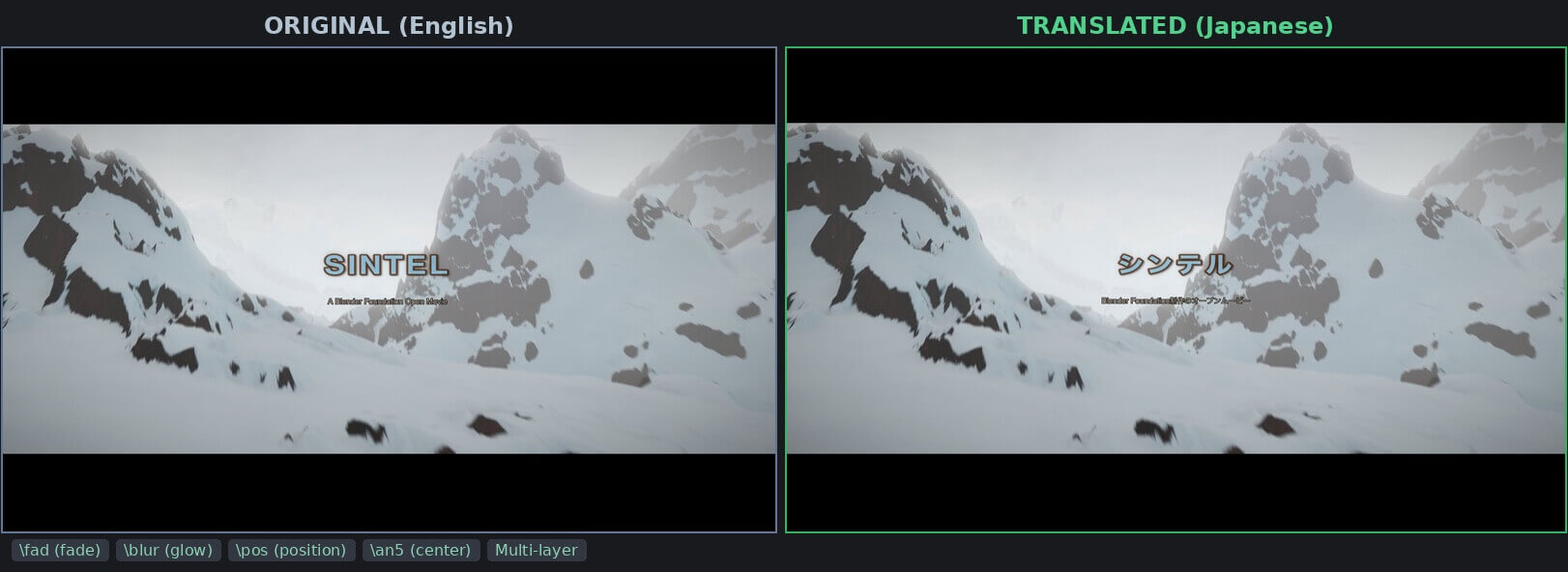
The opening title uses two layers — Layer 0 with \blur6 creates a dark glow behind the text, and Layer 1 renders the sharp title on top. After translation, "SINTEL" becomes "シンテル" and "A Blender Foundation Open Movie" becomes "Blender Foundation制作のオープンムービー". Both layers, the blur effect, the fade animation (\fad), and the centered positioning (\an5\pos(960,460)) are all preserved exactly.
Scene 1 — Positioned Signs, Scene Label, and Colored Dialogue
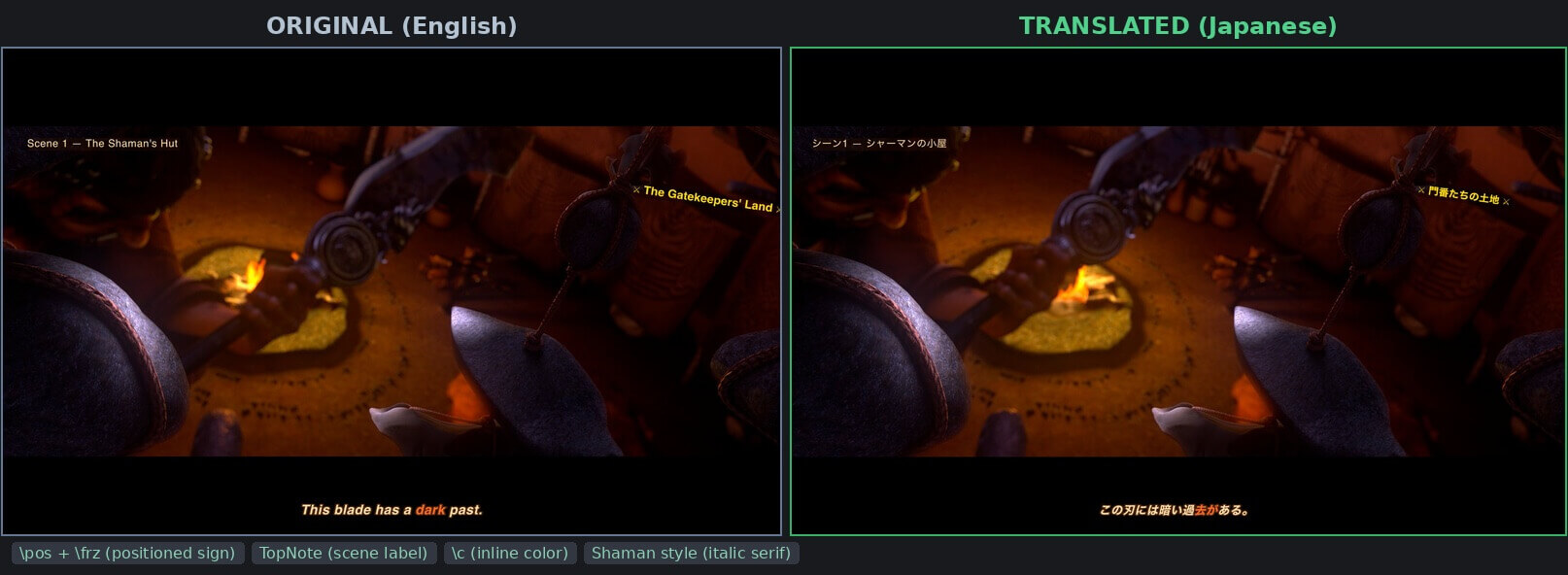
This is the most demanding test — three different ASS features visible simultaneously:
- TopNote (top-left): "Scene 1 — The Shaman's Hut" → "シーン1 — シャーマンの小屋" — uses BorderStyle=3 for an opaque background box, positioned at \an7\pos(60,35)
- Sign (right side): "⚔ The Gatekeepers' Land ⚔" → "× 門番たちの土地 ×" — positioned with \pos(1560,180) and rotated with \frz-8
- Dialogue (bottom): "This blade has a dark past." → "この刃には暗い過去がある。" — uses the italic serif Shaman style with the word "dark" highlighted in a different color via \c&H4466FF&\b1
All three elements maintain their exact screen positions, rotation angles, colors, and formatting after translation.
Karaoke — Syllable-by-Syllable Timing
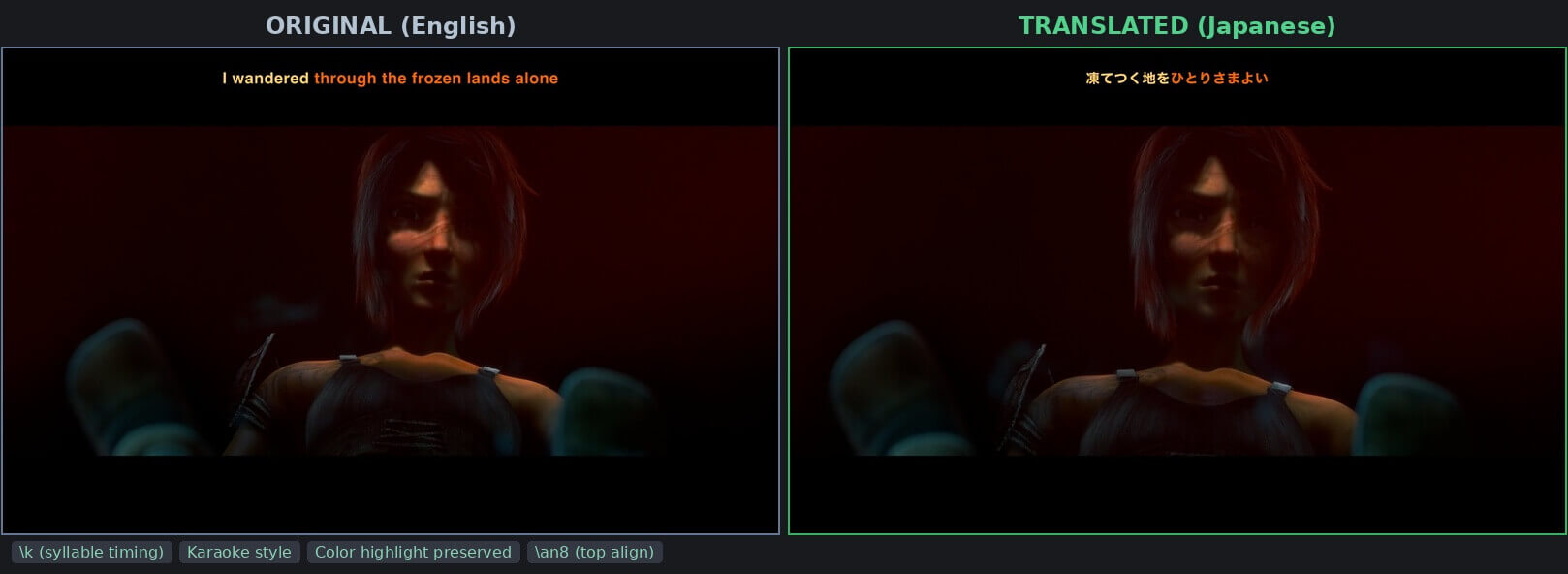
The end credits song uses \k tags for karaoke syllable timing. "I wandered through the frozen lands alone" becomes "凍てつく地をひとりさまよい". The orange highlight that sweeps through each syllable is driven by \k duration values (e.g., \k58, \k42, \k38), and these timing values stay completely untouched — only the text between them changes.
End Title — Fade, Blur, and Scrolling Credits
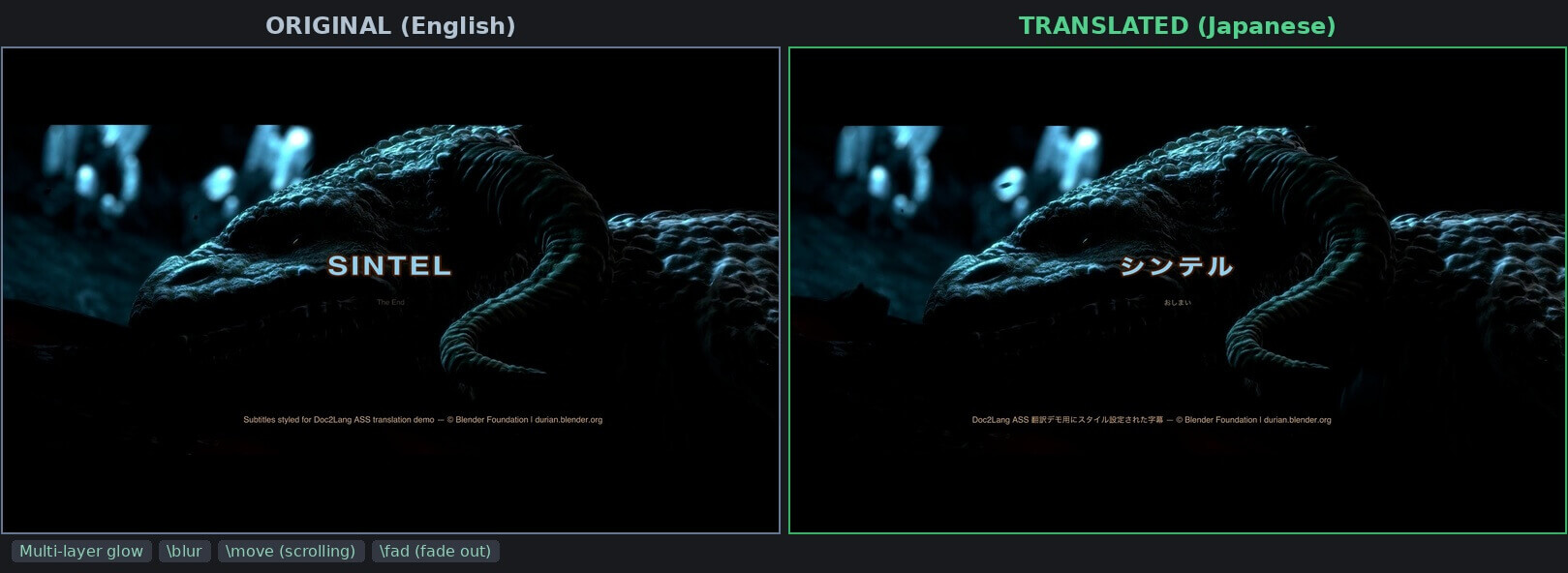
The closing sequence combines multiple effects: a multi-layer glowing title ("SINTEL" → "シンテル"), a fade-out subtitle ("The End" → "おしまい"), and a scrolling credits line using \move(1920,980,0,980) that slides across the bottom of the screen. The scrolling text was translated from English to Japanese while maintaining the exact same motion path.
Step-by-Step: How We Did It with Doc2Lang
Here's exactly how we translated the Sintel ASS file, step by step.
Upload Your .ass File
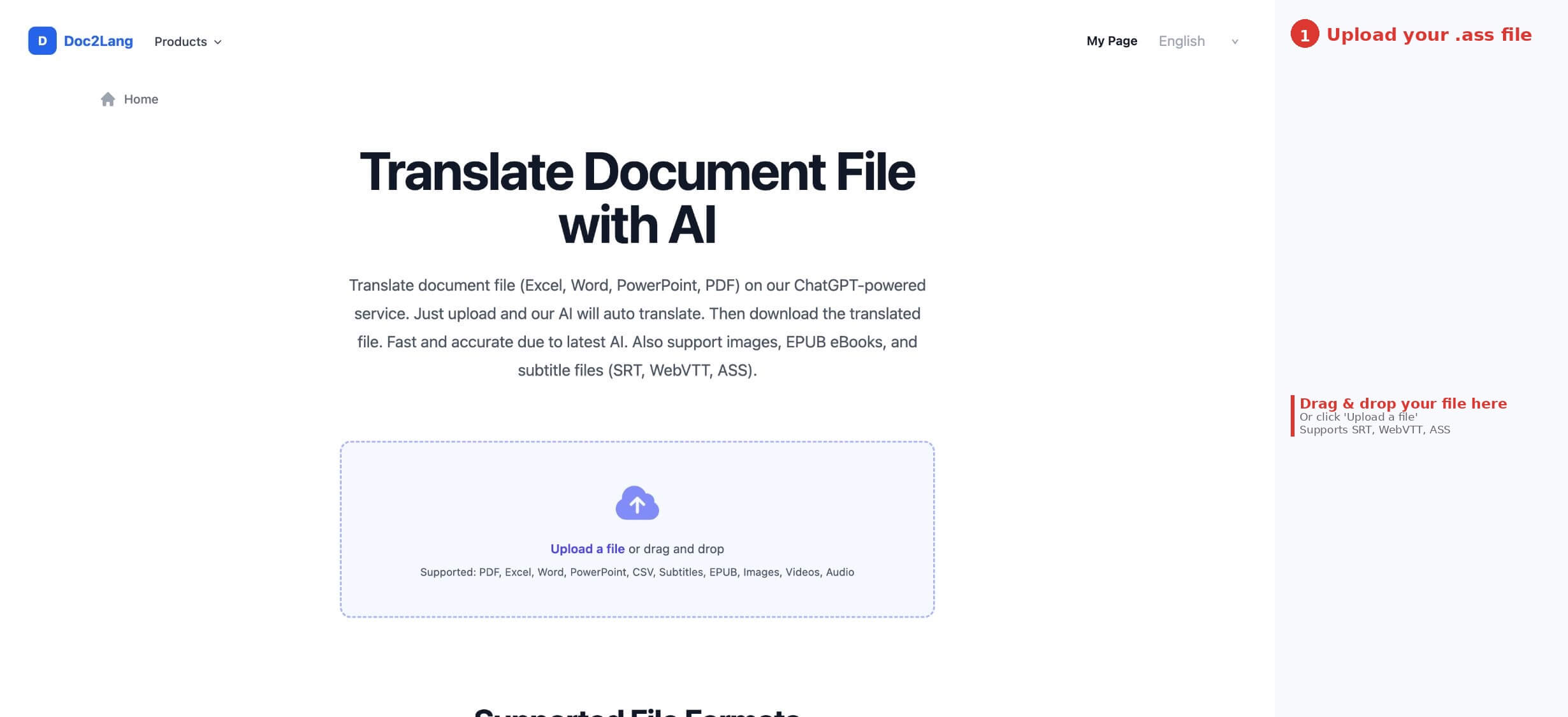
Go to doc2lang.com (or directly to doc2lang.com/ass-translate). You'll see the upload area in the center of the page — just drag and drop your .ass file, or click "Upload a file" to browse. Doc2Lang handles Subtitles alongside PDF, Excel, Word, and other file types. You can also upload multiple files at once or a ZIP archive containing an entire season.
Select Languages and Configure Settings
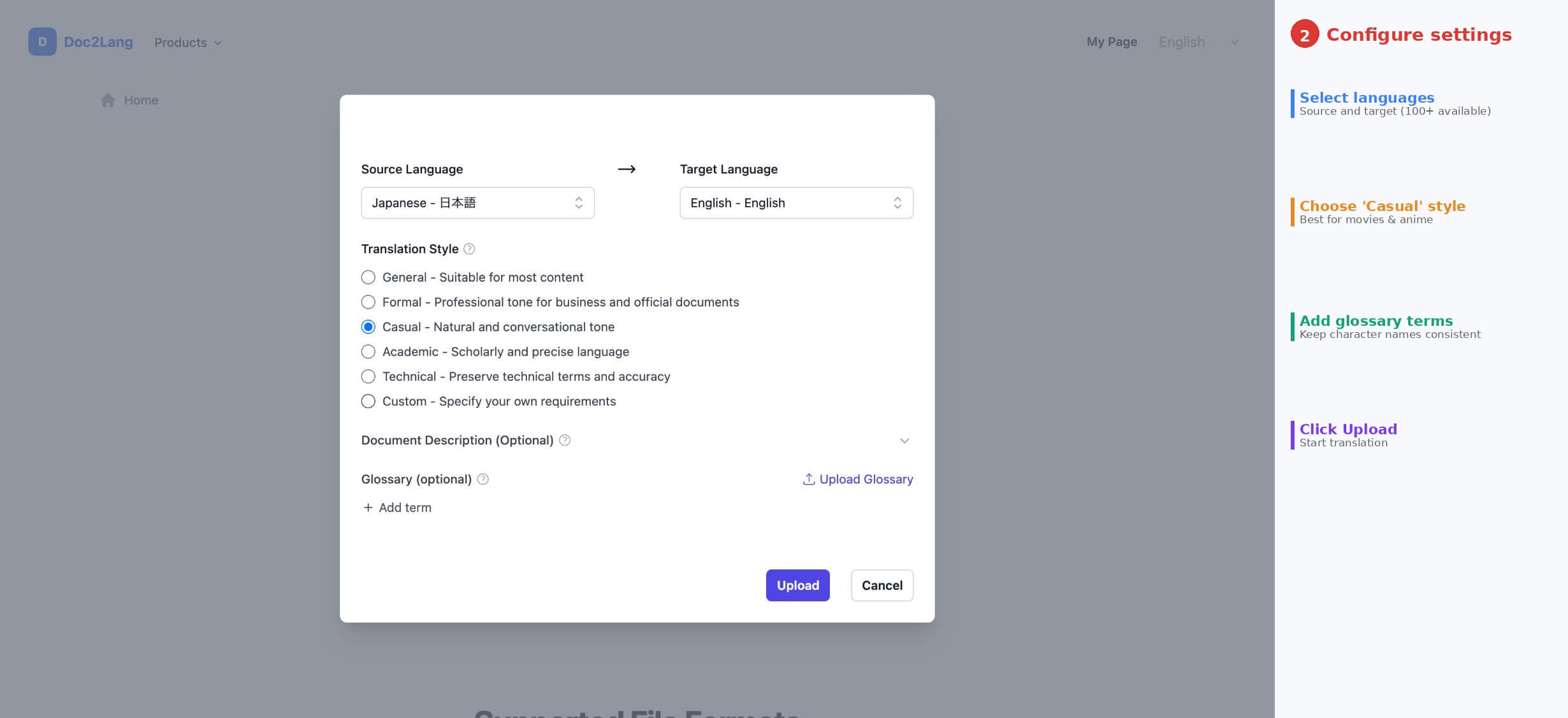
After uploading, a settings dialog appears. Choose your source language (English) and target language (Japanese) from 100+ options. Then pick a translation style — for Sintel's movie dialogue, we selected "Casual — Natural and conversational tone", which produces the most natural-sounding results for entertainment content. You can also add a Glossary to keep character names consistent (e.g., adding "Scales" → "スケールズ" to prevent the AI from translating the dragon's name differently each time). When everything's set, click Upload to start the translation.
Preview the Translation for Free
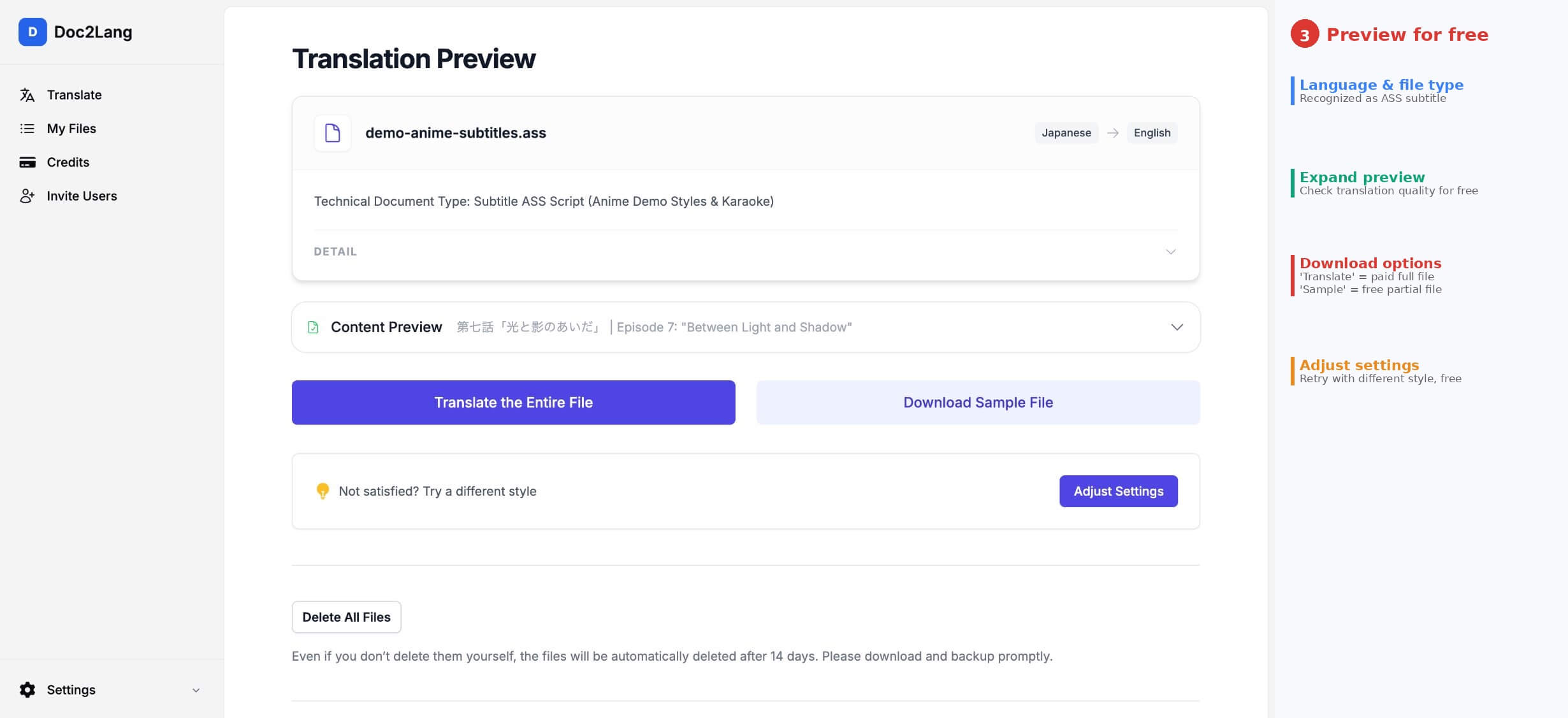
Doc2Lang generates a free preview before you pay. The Translation Preview page shows your file name, the detected language pair, and the document type.
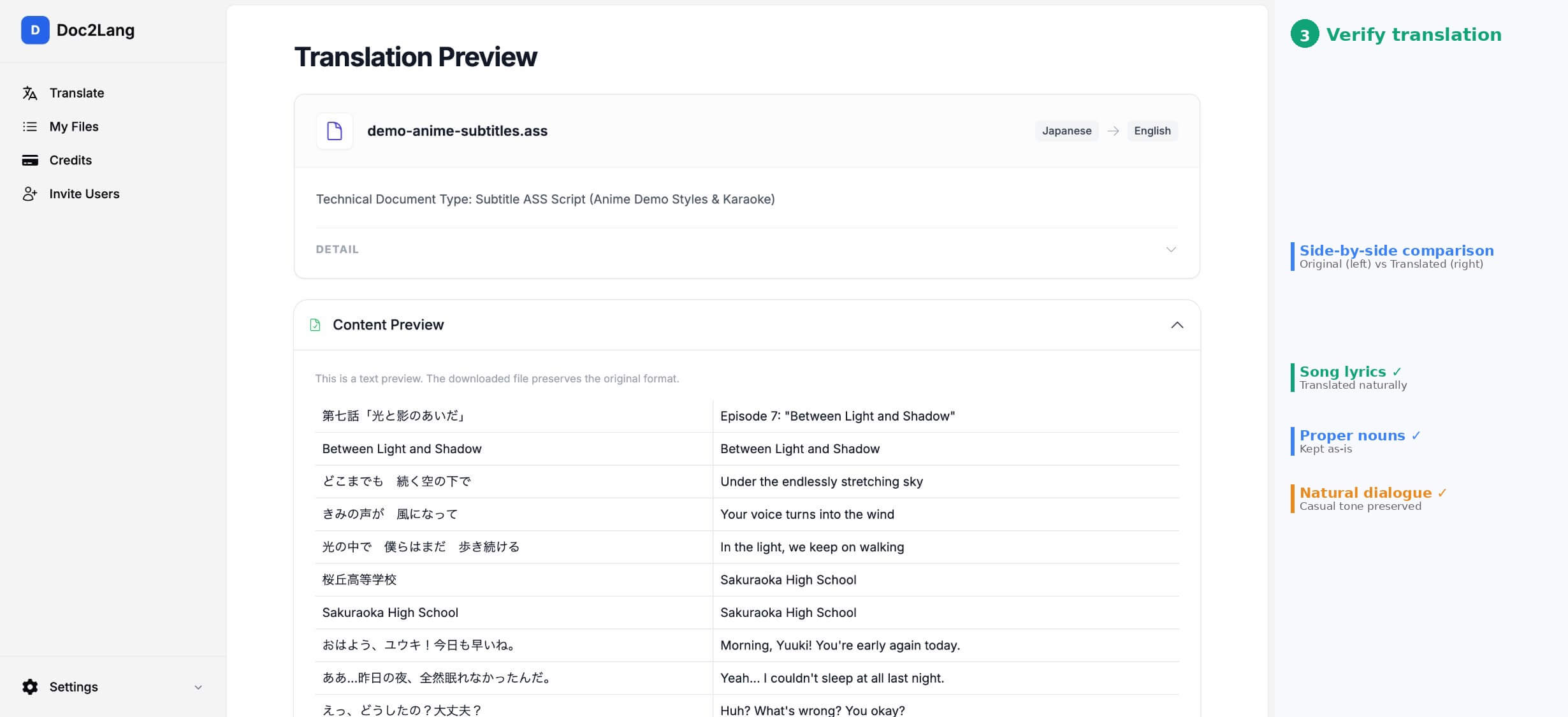
Click "Content Preview" to expand the translation table. You'll see the original text on the left and the translated text on the right — side by side. This is where you check whether the translation quality meets your expectations. Only the dialogue text is shown here; all the ASS formatting tags (\pos, \k, \fad, etc.) are preserved in the actual file but hidden from this preview for readability.
If you're not satisfied with the translation quality, click "Adjust Settings" to change the translation style or language and try again — at no cost. You can also click "Download Sample File" to get a partial translation as a free .ass file and test it in your video player before committing.
Pay and Download the Full File
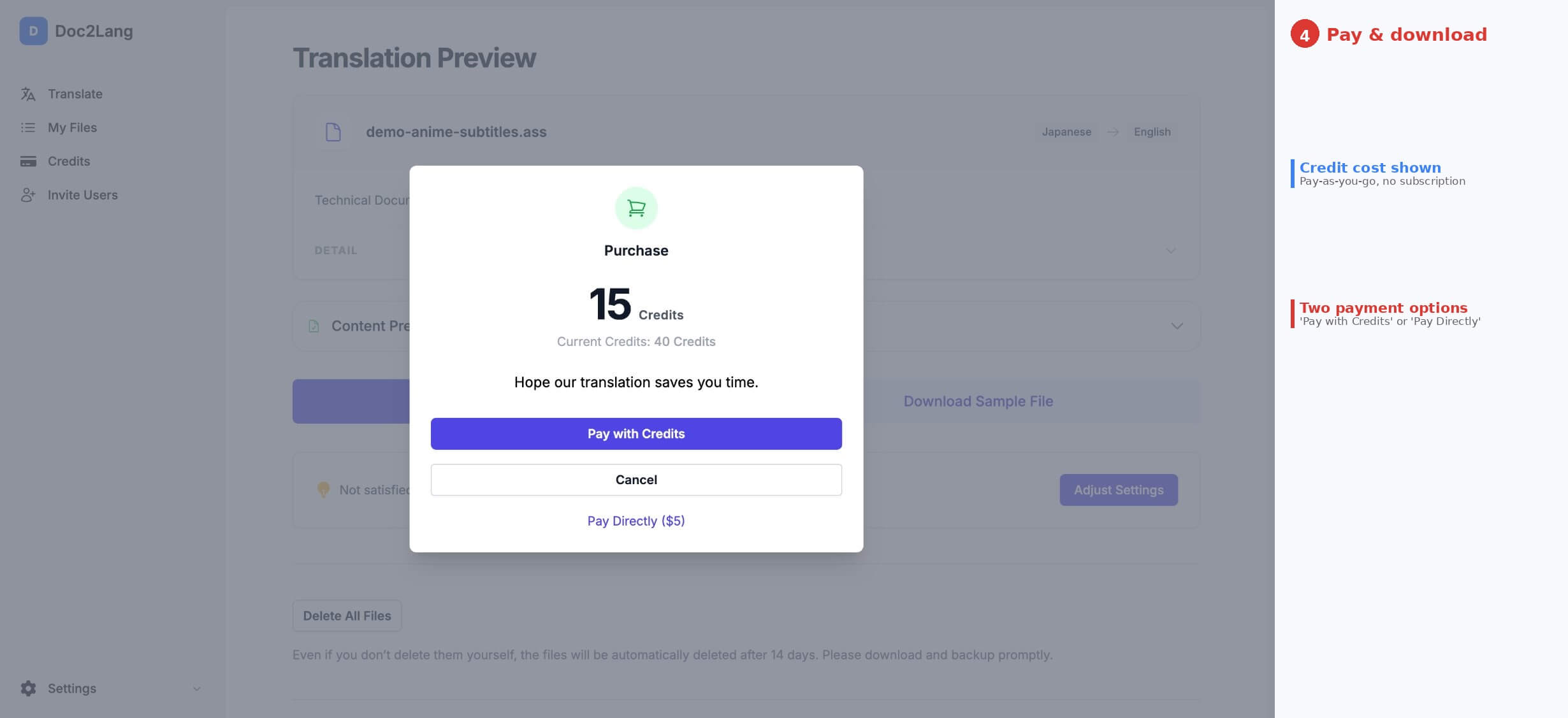
Once you're happy with the preview, click "Translate the Entire File". A purchase dialog appears showing the credit cost for your file. You have two payment options: use pre-purchased credits ("Pay with Credits") or pay directly for this specific file ("Pay Directly"). No subscription is required — it's completely pay-as-you-go.
After payment, the fully translated .ass file is ready for download. Open it in VLC alongside your video (via Subtitle → Add Subtitle File) to verify that all the positioning, colors, karaoke timing, and layer effects survived the translation.
What Gets Preserved
- All [V4+ Styles] definitions (fonts, colors, borders, shadows, alignment, margins)
- Override tags: \pos, \move, \fad, \clip, \iclip, \t, \c, \an, \frz, \b, \i, \fn, \fs, \bord, \shad, \be, \blur
- Karaoke tags: \k, \K, \kf, \ko with original timing values
- Layer ordering (Layer 0–9)
- Line breaks (\N, \n, \h)
- Drawing mode (\p1 ... \p0) — vector paths pass through untouched
- Ruby/furigana annotations — parent-child layers are maintained
- Comment lines — untranslated by default, with an option to include them
What Gets Intelligently Adjusted
- Font size (\fs) and vertical scaling (\fscy) may be adjusted when translated text is significantly longer or shorter than the source
- Backslash escaping is handled automatically to prevent conflicts with ASS tags
- Font names can be batch-replaced via a stylesheet template
Best Practices Before You Translate
Even with the right tool, following these preparation steps will give you cleaner results:
Clean Up Duplicate Style Names
If your ASS file has two styles both named "Default" (which can happen after merging files from different sources), translated lines may reference the wrong style. Open the file in Aegisub and rename duplicates before uploading.
Keep Lines to Single Sentences
ASS has no hard character limit per line, but very long lines can break layout after translation — especially when the target language is significantly longer than the source. Insert \N line breaks to split long dialogue before translating.
Use Unicode-Ready Fonts
Check that the font specified in your styles actually supports the target language. If you're translating from English to Japanese, a font like "Times New Roman" may lack Japanese glyphs. Use something universal like "Noto Sans" that covers both Latin and CJK characters, or enable auto font replacement when uploading.
Preview on a Real Player After Download
Even after a clean translation, always play the file in VLC or PotPlayer to check that karaoke sync looks right, positioned text hasn't drifted off-screen, and overlapping layers render in the correct order. Aegisub's preview is also useful for fine-tuning individual lines.
Common Use Cases
Anime Fansub Localization
The most common use case by far. Anime fansubs rely heavily on ASS formatting — karaoke openings/endings, styled sign translations, typeset episode titles, and multi-layer effects. Translating a fansub from English to Portuguese, Spanish, or Indonesian while preserving all that typesetting work saves fansubbers hundreds of hours per season.
Music Video Lyric Translation
Lyric videos and karaoke tracks use \k tags for syllable-by-syllable highlighting. Translating lyrics while keeping the karaoke bounce timing intact is nearly impossible manually — each \k duration is tied to the audio, not the text length. A format-aware translator replaces only the text after each \k tag.
E-Sports and Live Stream Overlays
Professional e-sports broadcasts use ASS subtitles for chat overlays, team name plates, and caster commentary with specific positioning and brand colors. Translating these for multi-language streams requires preserving exact screen positions and color schemes.
Corporate Video Localization
Training videos and promotional content with motion-graphic subtitles often use ASS for dynamic text effects. Translating for international offices means keeping the visual consistency of the original production.
ASS Translation FAQ
Will karaoke timing shift after translation?
No. The \k tag values (which represent duration in centiseconds) stay exactly as they are. Only the syllable text changes. If the translated syllables are much longer or shorter than the originals, you may want to fine-tune in Aegisub after translation.
Can I convert the translated ASS file to SRT?
Yes, but you'll lose all styling. If you need SRT output, use Aegisub or Subtitle Edit to export after translation. Only do this if the target platform doesn't support ASS.
What about .ssa (older SubStation Alpha) files?
SSA files are fully supported. They're processed with the same tag preservation as ASS files, though SSA uses the older [V4 Styles] section instead of [V4+ Styles].
Is there a file size or line count limit?
Doc2Lang supports files up to 30 MB or 200,000 lines. For larger batches (e.g., an entire series), split into individual episode files or upload as a ZIP archive.
What about privacy?
Files are transferred over HTTPS with HSTS. You can delete files immediately after download, or they're automatically erased after 14 days. Subtitle content is processed through the AI translation engine in real time and is not used for model training.
Conclusion
ASS subtitle files are powerful but fragile. Their rich formatting — the styles, overrides, karaoke tags, layers, and positioning that make them the format of choice for anime, music videos, and professional localizations — is exactly what breaks when you try to translate them with generic tools.
As we showed with the Sintel example, a proper ASS-aware translator can handle positioned signs, karaoke timing, multi-layer glow effects, inline color changes, and multiple subtitle styles — all in a single file — without breaking any of them. The translated Japanese file loaded cleanly in VLC with every effect intact.
Film footage: Sintel © Blender Foundation | durian.blender.org — Creative Commons Attribution 3.0
Ready to translate your ASS subtitles?
Upload your file, preview the result for free, and download a perfectly formatted translation in minutes