Translate Multiple Files at Once with Doc2Lang
Put your documents in a ZIP and Doc2Lang unpacks it in your browser, so you translate only the files you pick. Steps, supported formats, size limits, and what does not get translated.
In short
- Put your documents in one ZIP archive, up to 200 MB, and drop it on the upload area.
- The archive is unpacked in your browser. Only files you press Upload on are sent to us.
- Choose language, model, style and glossary once. Every file from that archive reuses them.
- Each file gets a preview with its exact price before you pay. Files you skip cost nothing.
Free preview, no account needed
Upload a whole folder of documents in one go. Bundle them into a ZIP archive and Doc2Lang opens it in your browser, lists what is inside, and lets you translate the files you actually need. Formatting, formulas and layout survive, because each format is read by the parser built for it.
Required: nothing. You do not need an account to upload an archive and read the translation preview.
Translate multiple files
- Put your documents in a ZIP archive. On Windows, right-click the selection and choose Send to → Compressed (zipped) folder. On macOS, right-click and choose Compress.
- Open the batch document translation page.
- Drag the archive onto the upload box, or click to select it.
- Choose the source and target language.
- (Optional) Choose the translation model, a style, or a glossary.
- Click Upload on each file you want translated.
- Read the preview, then pay for that file and download it.
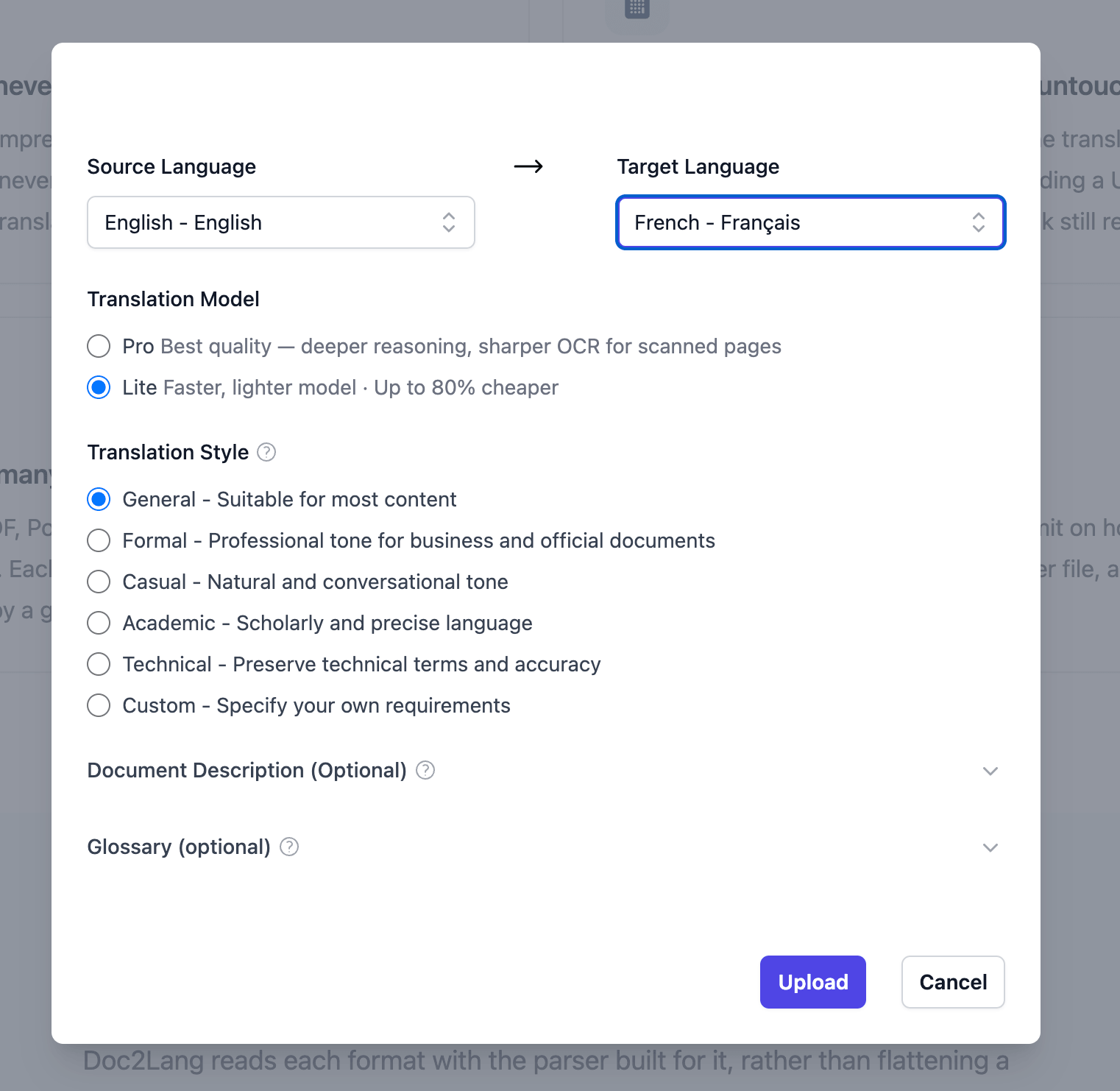
Options are set once per archive. Every file you go on to translate from it reuses the same language, model, style and glossary.
Keep one source language per archive. The source language you pick is applied to every file you upload from that ZIP, even if the languages vary. Mixing them leads to poor translations.
Choosing between the models: Pro reasons more deeply and reads scanned pages more sharply. Lite is faster and up to 80% cheaper. For routine spreadsheets, Lite is usually enough. For a scanned contract, Pro earns its price.
The archive stays on your device
Doc2Lang decompresses the ZIP on your own machine and lists everything inside it, with each file's path and size.
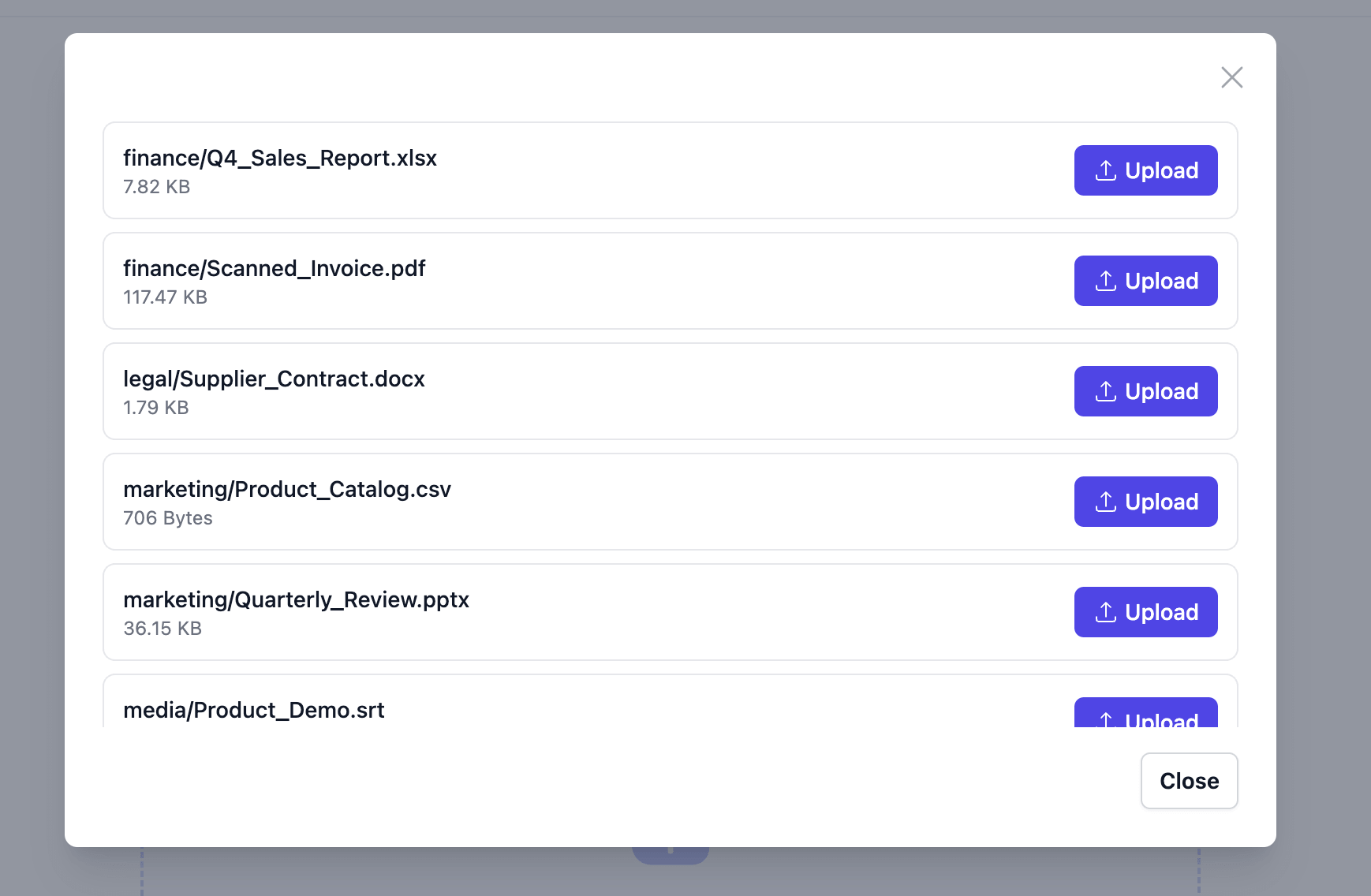
Nothing has been uploaded at this point. Close the tab here and not a single byte of your documents has reached us.
Each row has its own Upload button. Press it on the files you need and leave the rest alone.
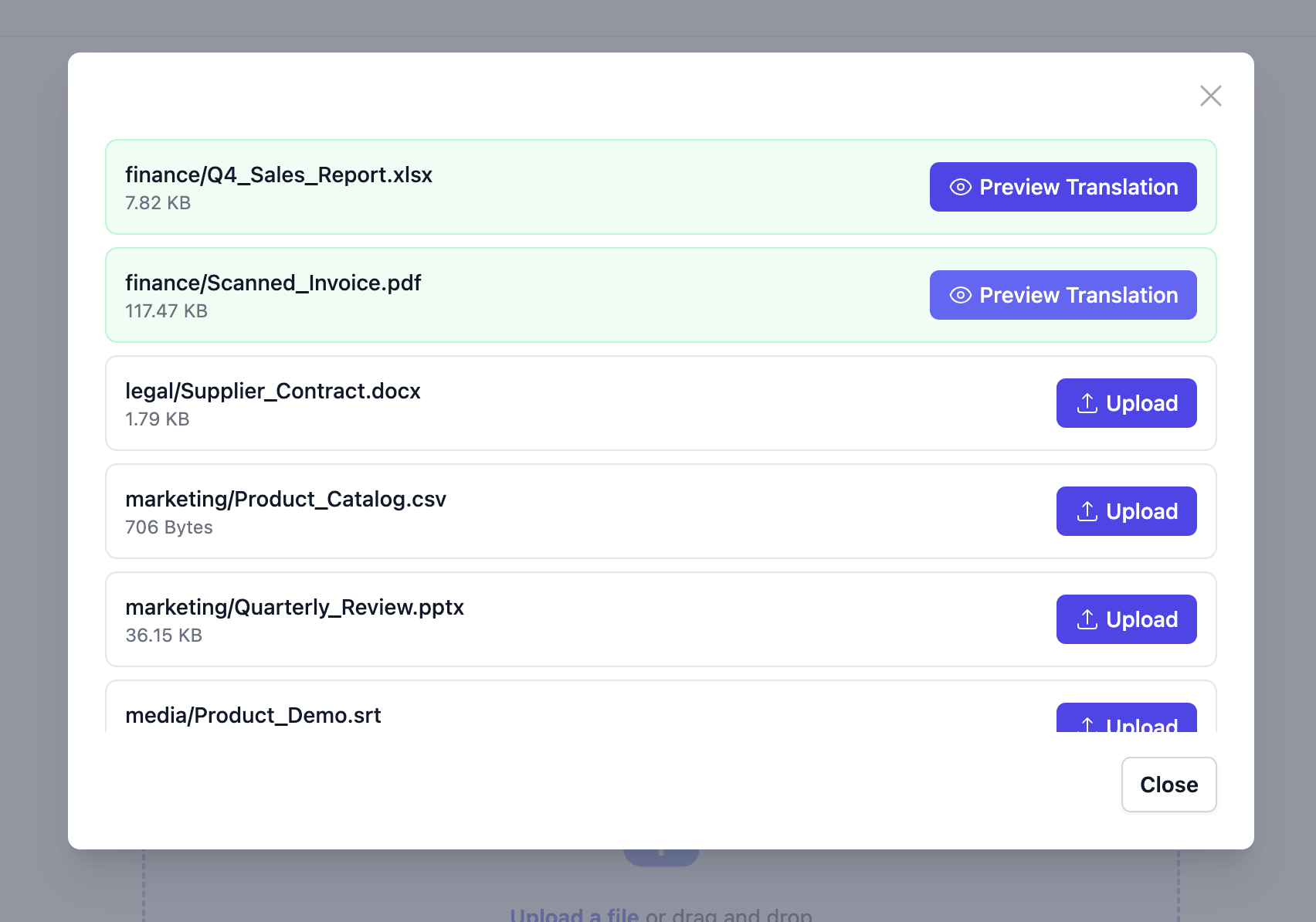
Files you never upload stay on your device and never appear on your bill.
Check the preview before you pay
The preview puts the original beside the translation.
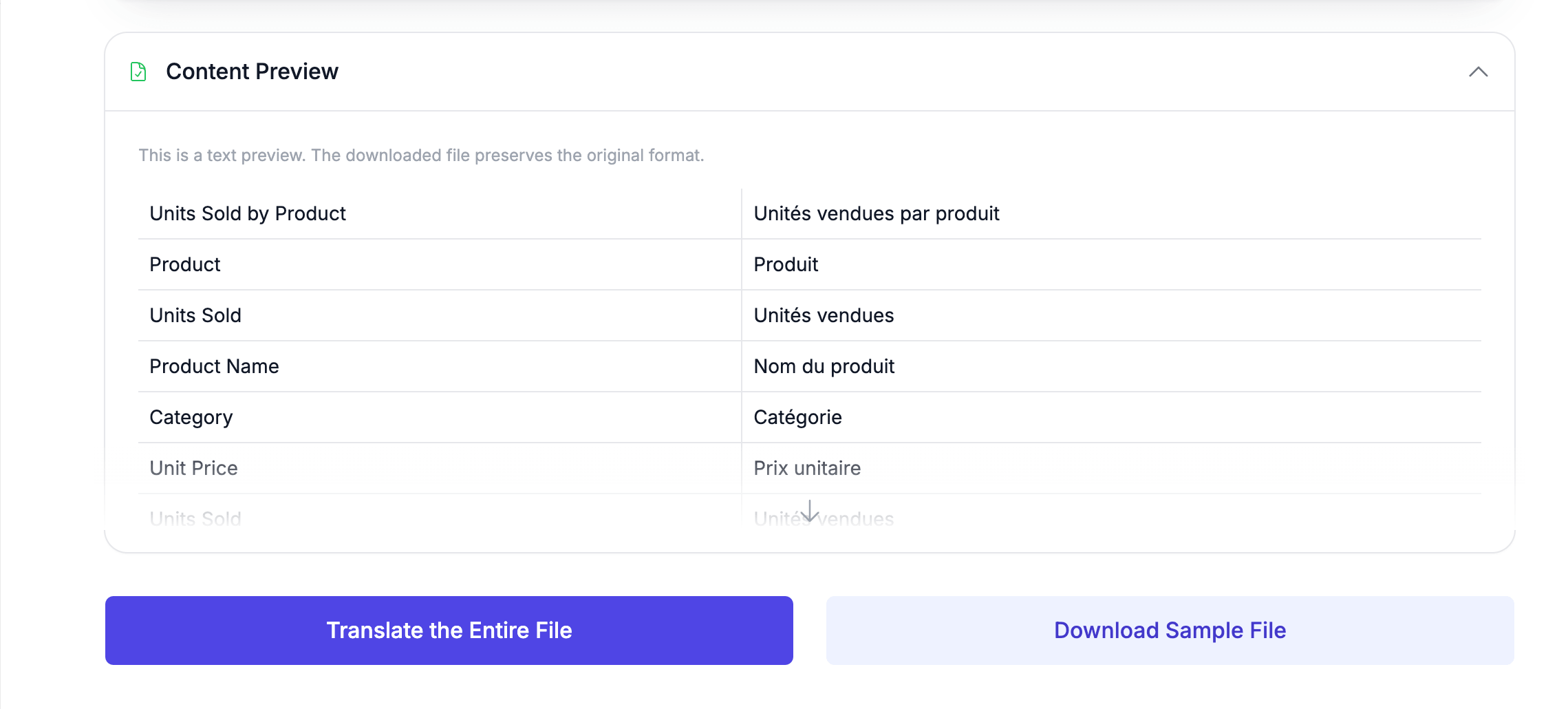
Look at the first three rows. Units Sold by Product, Product and Units Sold are not cells. They are a chart title and its two axis labels, which sit outside the spreadsheet grid. Most spreadsheet translators never touch them.
The price appears after the preview, and it is the price for that one file. Each translated document downloads on its own, in the format you uploaded it in.
Translated files are not repackaged into a ZIP. You download them individually.
Supported file types
| Format | Extensions | Notes |
|---|---|---|
| Excel | .xlsx, .xlsm | Every sheet, cell by cell. Charts and text boxes included. |
| Word | .docx | Paragraphs, tables and headings, translated in place. |
| PowerPoint | .pptx | Slide text, speaker notes, layouts and masters. |
.pdf | Text pages, and scanned pages read with OCR. | |
| Data | .csv, .tsv | Delimited files. Numbers and URLs are left alone. |
| Subtitles | .srt, .vtt, .ass | Dialogue only. Timings never move. |
The legacy formats
.xls,.docand.pptcannot be translated. Open them once in Excel, Word or PowerPoint, save as.xlsx,.docxor.pptx, and then build your archive.
Limits
| What | Limit |
|---|---|
| Archive size | 200 MB |
| Files per archive | No fixed limit |
| Nested ZIP files | Not supported |
We impose no limit on the number of files. The real ceiling is your browser's memory, because the archive is unpacked on your device rather than on a server. If a very large archive stalls, split it into a few smaller ones.
What gets translated, and what does not
| Content | Translated? | What happens |
|---|---|---|
| Text in cells, paragraphs, slides and subtitles | Yes | Sent to the model with its surrounding context. |
| Excel formulas, numbers and URLs | No | =SUM(B2:B10) comes back exactly as it went in. Numeric cells are skipped, as is any cell holding only a number or a URL. |
| Excel charts and text boxes | Yes | Chart titles, axis labels, series names and shape text. |
| Scanned pages in a PDF | Yes | Read with OCR, then placed back where the original text sat. |
| PowerPoint speaker notes | Yes | Notes, slide layouts and slide masters. |
| Subtitle timings | No | Only the dialogue lines change. |
| Text inside embedded images | No | A picture in a spreadsheet or slide is not read as text. Scanned PDFs are the exception. |
| Styles and layout | No | Only a value is rewritten. Fonts, fills and number formats stay put. |
This is why a translated workbook still calculates. The formula cells were never read as text, so there was nothing for a model to get wrong.
The archive stays in your browser
Troubleshooting
A file will not translate. Check its extension against the table above. Legacy .xls, .doc and .ppt files are the usual cause.
The archive will not open. Archives above 200 MB are rejected. A ZIP inside your ZIP is not unpacked, so extract it first.
A large archive hangs on the file list. Unpacking happens in your browser, so it competes with your other tabs for memory. Split the archive.
A scanned PDF came back with odd wording. OCR quality depends on the scan. The Pro model reads scanned pages more sharply than Lite, and a straight, high-contrast scan beats a photograph of a page.
Terms are translated inconsistently across files. Add a glossary before you upload. Product names, internal jargon and units of measure drift easily across forty documents.
Frequently asked questions
Is my ZIP file uploaded to your servers?
No. The archive is decompressed in your browser, on your own machine. We never receive it. Only the individual files you explicitly select are uploaded, and the ones you skip never leave your device.
Will my Excel formulas still work after translation?
Yes. Only text cells are sent to the translation model. Formula cells are never read as text, numeric cells are skipped, and so is any cell holding just a number or a URL. A translated workbook recalculates exactly as the original did.
Can I download all the translations as one ZIP?
Not today. You upload via ZIP for convenience, but each translated document is downloaded on its own.
Can I mix formats in one archive?
Yes. A spreadsheet, a slide deck, a scanned PDF and a subtitle file can share one ZIP. Each is routed to the engine built for its format.
Do I pay for files I decide not to translate?
No. Unpacking the archive and listing its contents is free. Billing happens per file, at the moment you send that file for translation, and the price is shown to you beforehand.
What happens to my files afterwards?
Transfers are encrypted with HTTPS. You can delete your files immediately after downloading, and anything left behind is erased automatically after 14 days. Your documents are not used to train AI models.
Can I translate a single file instead?
Yes. There are dedicated pages to translate Excel files online and to translate a PDF without losing its layout, each with the same preview and per-file pricing.
Start with your own archive
A quarter of sales reports, a folder of supplier contracts, a product catalogue in six formats. Zip them, drop the archive in, and see what is inside without uploading anything.
Free preview, pay per file