The 6 Best PDF Translators in 2026: One Hands-On Layout Test
Compare 6 PDF translators for formatting, OCR, free limits, output formats, and pricing, with one original English-to-French Doc2Lang layout test.
The best PDF translator depends on what you need back. Google Translate is the easiest completely free option for a text-based PDF. DeepL is a strong choice for fluent document translation. ChatGPT is useful when you want to question or rewrite a document. Adobe Acrobat and Canva make sense when editing matters. Doc2Lang is our pick when the translated PDF must keep the original page design.
For this comparison, we translated a nine-page, two-column research paper from English to French with Doc2Lang and inspected its title page, tables, charts, citations, fonts, page breaks, and bilingual output. For Google Translate, DeepL, Adobe Acrobat, Canva, and ChatGPT, we compared the same document requirements against each provider's current official workflow and limits. We did not manufacture test scores for outputs we did not independently capture.
Jump to how we compared the tools or see the recorded layout evidence.
Disclosure: Doc2Lang is the service operated by this website. Its hands-on result is therefore labeled separately from the five products assessed from official documentation. Product names and trademarks belong to their respective owners.
The short answer
- Best free PDF translator: Google Translate for a quick reading copy of a text-based PDF.
- Best for keeping formatting: Doc2Lang for columns, tables, charts, footnotes, and bilingual output.
- Best for an established document workflow: DeepL, especially when glossary controls and eligible DOCX output matter.
- Best for asking questions about a PDF: ChatGPT, with important plan-dependent limits for embedded visuals.
- Best for editing after translation: Adobe Acrobat or Canva.
PDF translator comparison table
“Free” can mean a complete free download, a limited account allowance, one free use, or only a preview before payment. The table keeps those categories separate.
People looking for an online PDF translator usually want to translate a PDF online without installing desktop software. All six options below have a browser-based workflow, although Adobe may hand the file from Acrobat to Adobe Express.
| PDF translator | Best for | Free allowance | Formatting | OCR | Translation approach | Output | Price | Sign-up |
|---|---|---|---|---|---|---|---|---|
| Doc2Lang | Layout-critical PDFs | Free preview | Close page correspondence in our example | Built in (product feature; not exercised by this digital sample) | Context + editable terminology | Formatted, text-only, bilingual PDF | Per file €16 in this test | Not for preview |
| Google Translate | Fast, free reading copy | Complete document | Basic preservation | Scanned text is not translated | General machine translation | Translated PDF | Free | No |
| DeepL | Document workflow and glossary controls | Account limits apply | Designed to retain format | PDF conversion may use OCR | Document MT + glossary options | PDF; DOCX on eligible plans | Free account / subscription | Yes |
| Adobe Acrobat | Translate, then edit | Access depends on plan | Editable in Adobe Express | Translation may skip scans | AI translation with tone choice | Plan-dependent | Yes | |
| Canva | Designed PDFs and brochures | One free use | Easy manual adjustment | Not a dedicated OCR workflow | NMT inside a design editor | PDF and design formats | One use / subscription | Yes |
| ChatGPT | Questions, summaries, rewrites | Usage limits apply | Usually reconstructed | Embedded PDF visuals: Enterprise only | Prompt-driven LLM | Chat response; generated files vary | Free / subscription | Yes |
The Doc2Lang row contains observations from our file. The other rows summarize current official capabilities rather than claiming an unrecorded side-by-side result. Limits and plan access can change, so verify them before uploading a sensitive or business-critical file.
How we compared the PDF translators
Test document and language direction
Our hands-on file was a nine-page open-access research paper translated from English to French on July 21, 2026. It contains the elements that expose weak PDF translation workflows:
- two-column body text;
- a title page with narrow metadata columns;
- tables containing text and images;
- charts, legends, and axis labels;
- citations, links, symbols, and statistical notation;
- footers, page numbers, and section headings.
We do not provide the source or translated PDF as a download in this article. The screenshots show only the portions needed to evaluate the workflow and layout.
Source and license: The test paper is Paul Compensis, “Assessing the integration of social information using AI-generated videos: a brief research report,” Frontiers in Psychology, DOI 10.3389/fpsyg.2025.1505843. The original is licensed under Creative Commons Attribution 4.0. The French translation and side-by-side screenshots shown here are adaptations generated with Doc2Lang for this comparison; the original author and publisher do not endorse Doc2Lang or this article.
Evidence levels
- Hands-on evidence: Doc2Lang upload settings, free preview, quoted price, bilingual PDF, and output choices.
- Official-documentation review: Google Translate, DeepL, Adobe Acrobat, Canva, and ChatGPT limits and workflows.
- No invented measurements: We do not publish processing times, OCR error counts, or quality scores for tools without a recorded run.
- Evidence check for this article: Our editorial team compared the screenshots for page correspondence, headings, terminology, captions, and readable prose. This was article preparation, not a human translation or review service offered by Doc2Lang, and not a blinded evaluation by independent native French linguists.
This evidence split follows the spirit of Google Search Central's guidance for high-quality reviews: show first-hand evidence, explain benefits and drawbacks, identify the best use cases, and use quantitative measurements only when you actually have them.
Scoring framework for your own test
If you compare these services with your own files, use the same document and language direction for every product. A useful weighted score is 30% translation accuracy, 30% formatting retention, 15% OCR accuracy, 10% usability, 10% free allowance and price, and 5% privacy and file control. Do not score OCR on a born-digital PDF; use a separate scanned file with a verified transcription.
The best PDF translators compared
1. Doc2Lang: best for translating a PDF without losing formatting
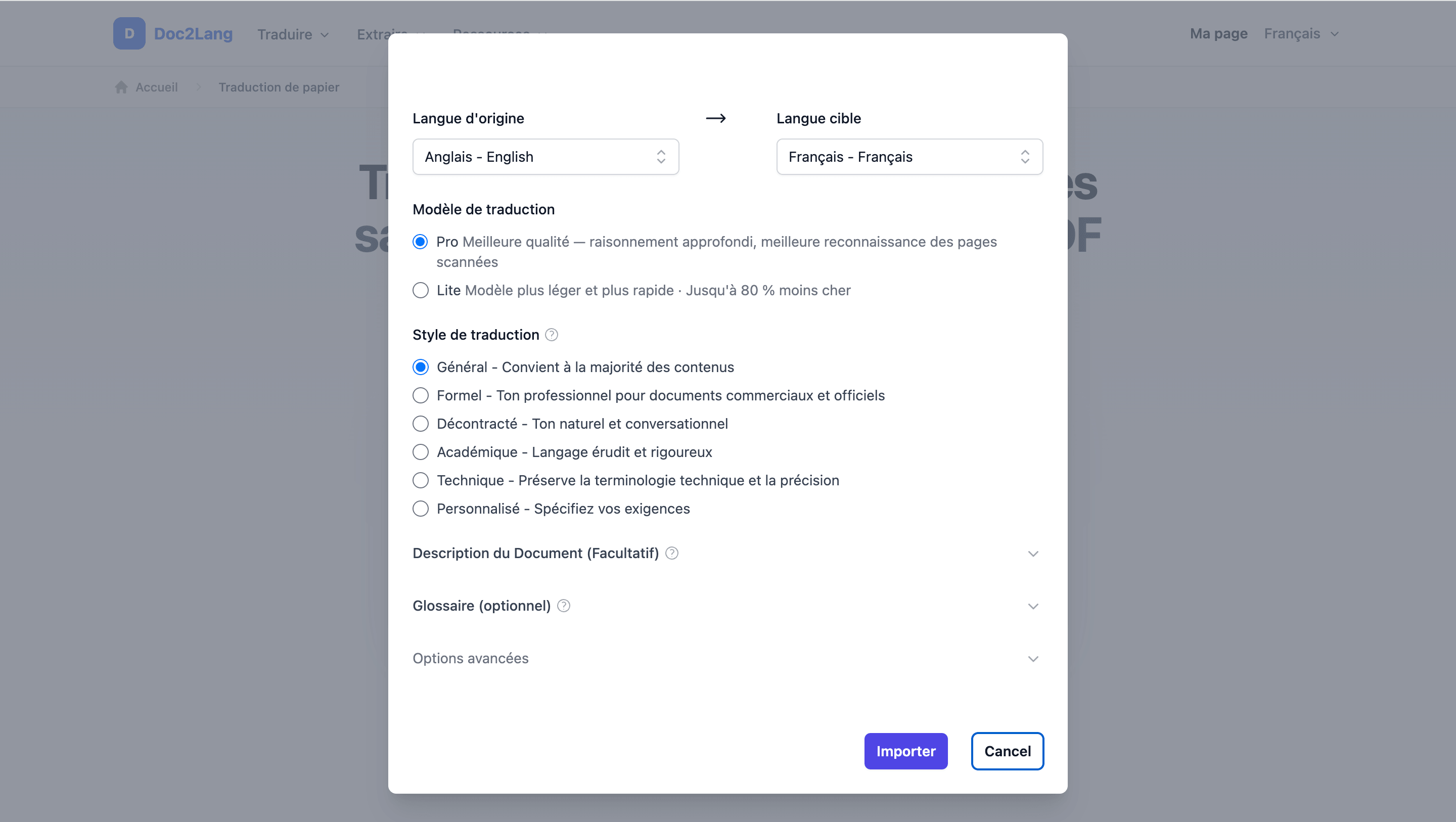
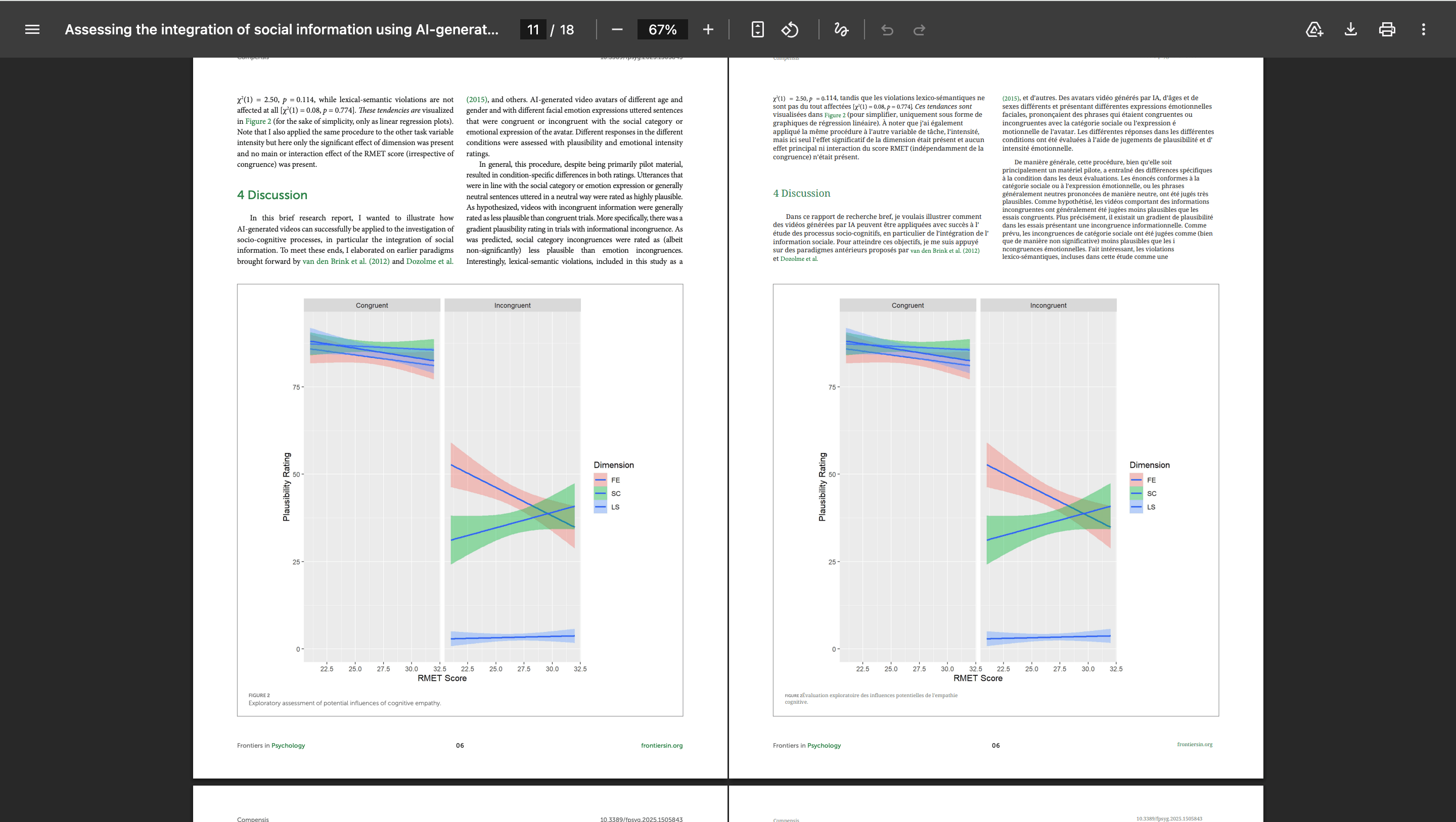
Doc2Lang's PDF translator extracts text, translates it with page context, and places the translation back into the corresponding page regions. In our English-to-French paper, the translated version kept the original page count. The optional bilingual PDF expanded to 18 pages because each source page is followed by its translated counterpart.
The title page retained the journal branding, author block, narrow metadata column, green headings, citations, and two-column structure. French text is longer than English in many passages, yet the section hierarchy remained recognizable.
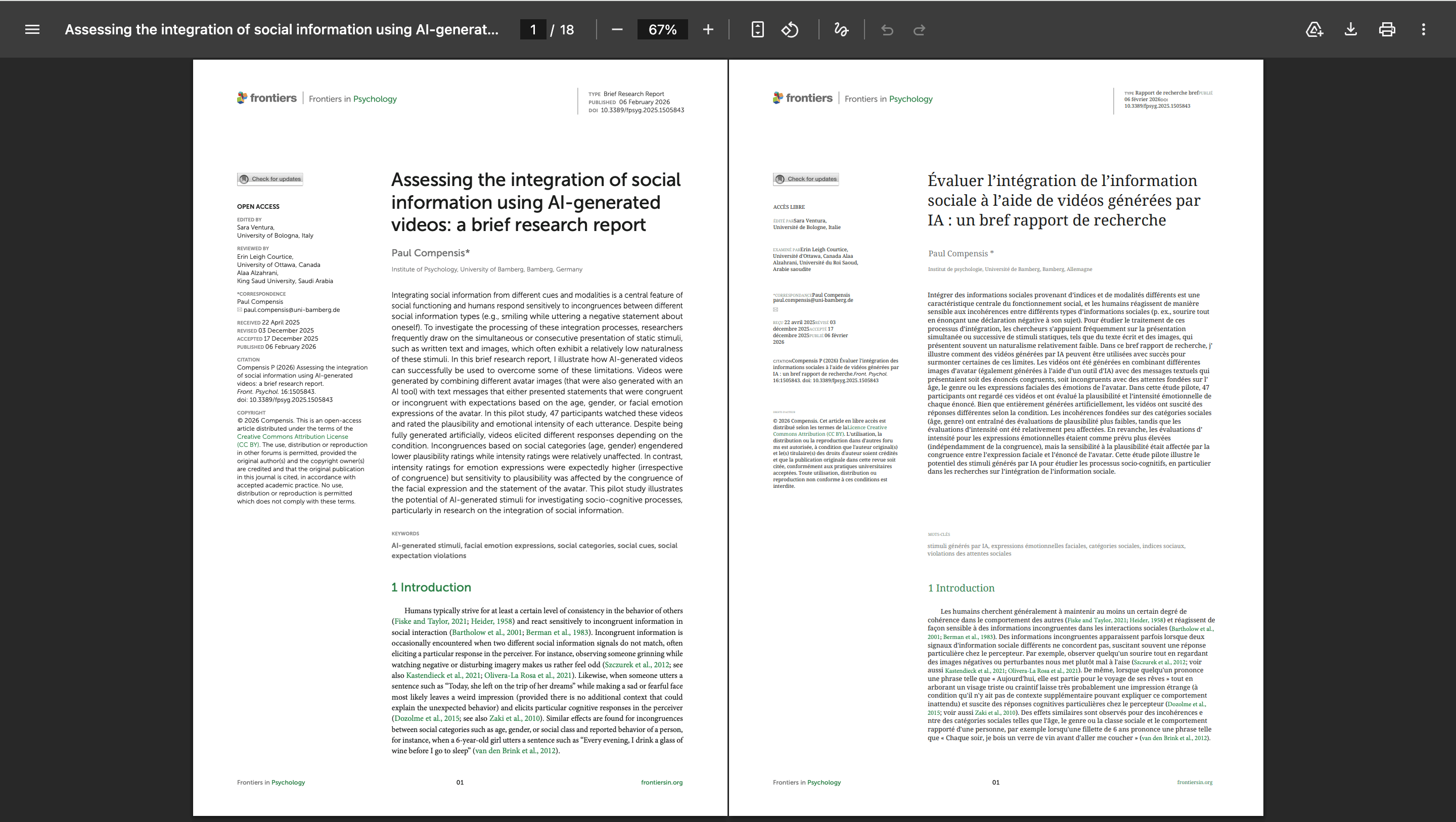
Tables are harder than ordinary paragraphs because the translated text must fit fixed cells while images stay anchored. The recorded table page kept all three image columns, header shading, row labels, captions, footnotes, and the two-column text below it.
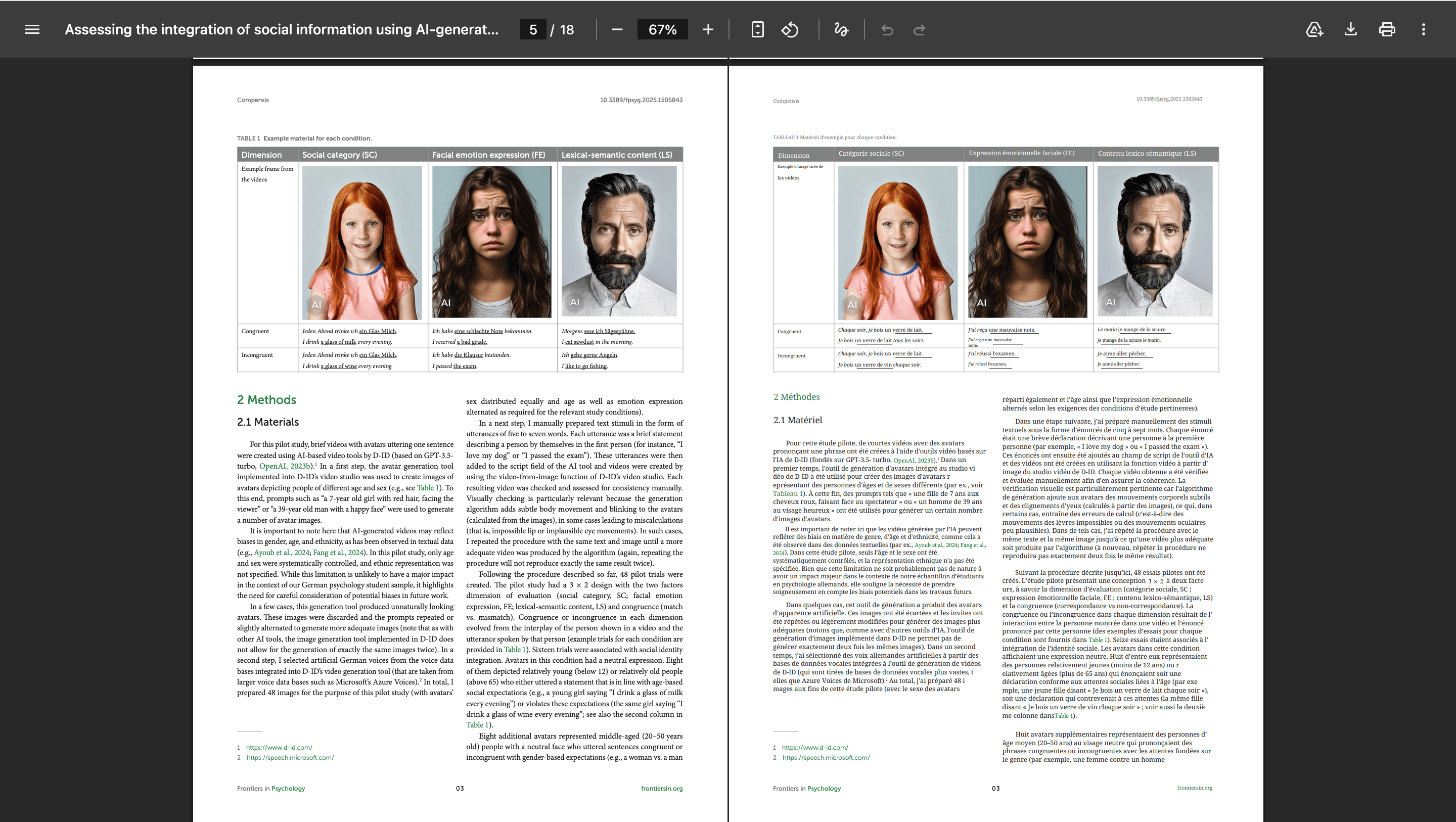
Charts stayed as visual objects while surrounding captions and prose were translated. This avoids redrawing the data, but it also means text baked into a chart image may remain in the source language. Always check axis labels and legends separately.
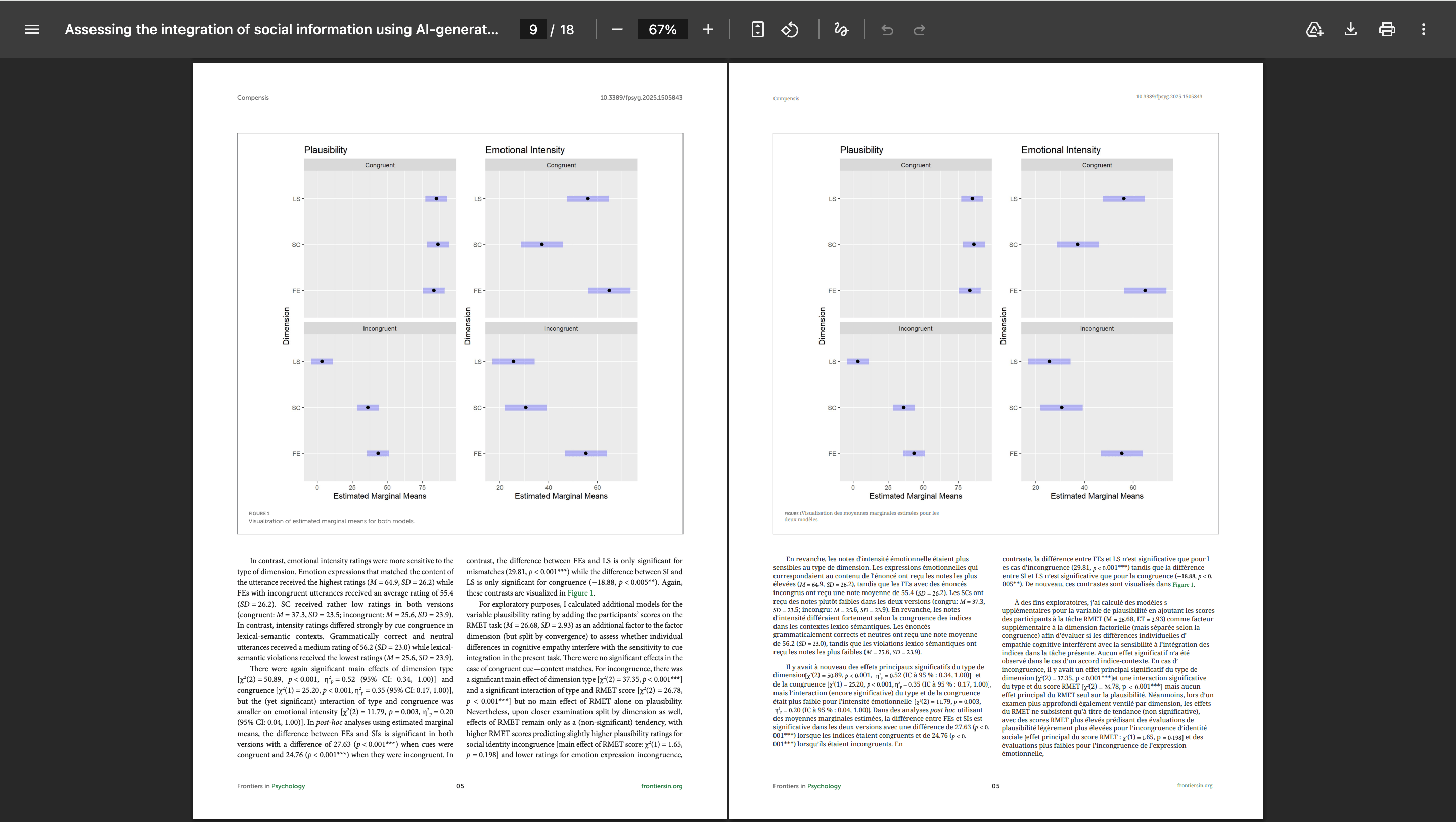
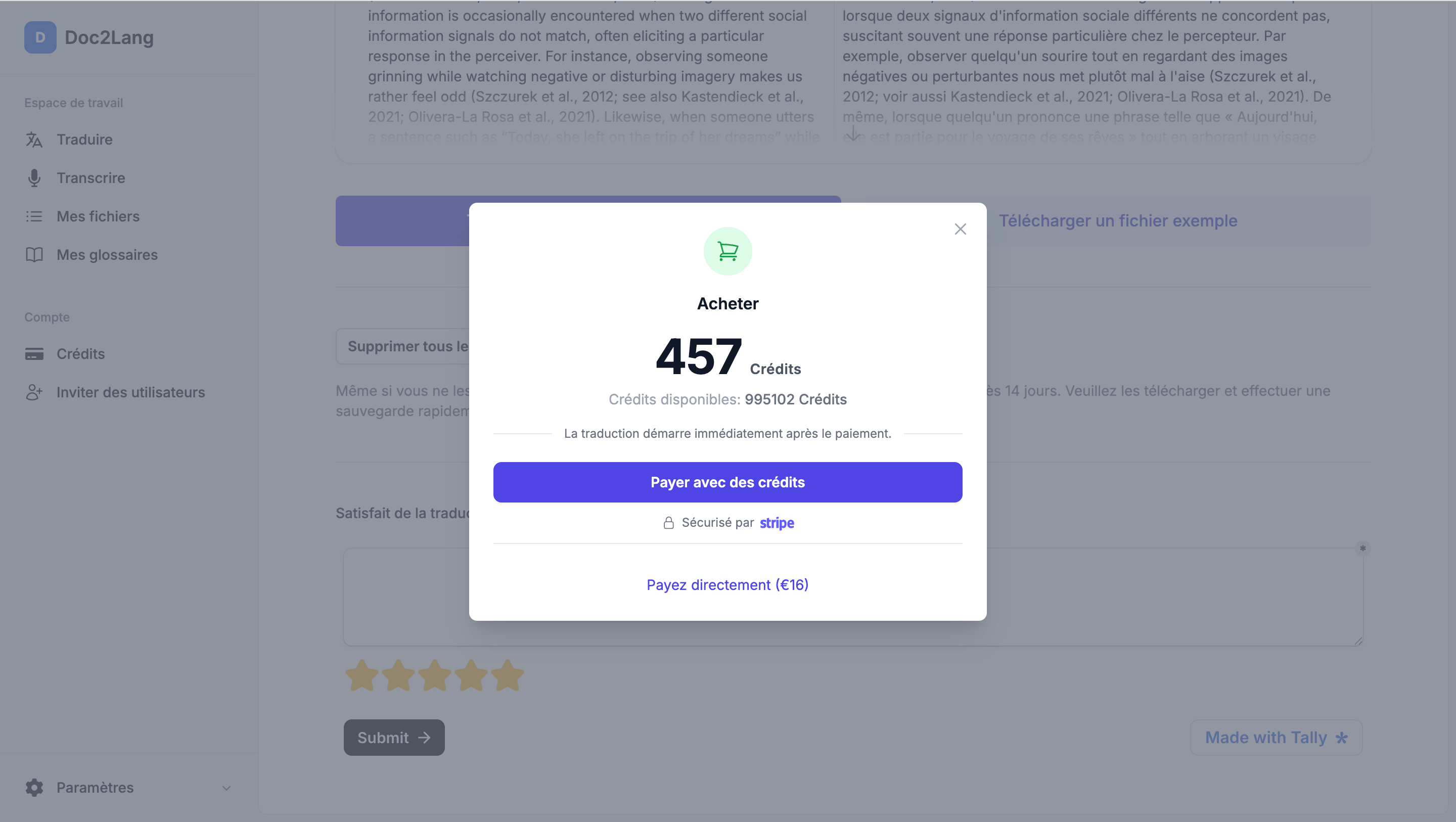
The free stage is a preview, not a free full-document download. This file was quoted at 457 credits or €16. The amount depends on the document and model, so it should be treated as an observed example, not a universal price.
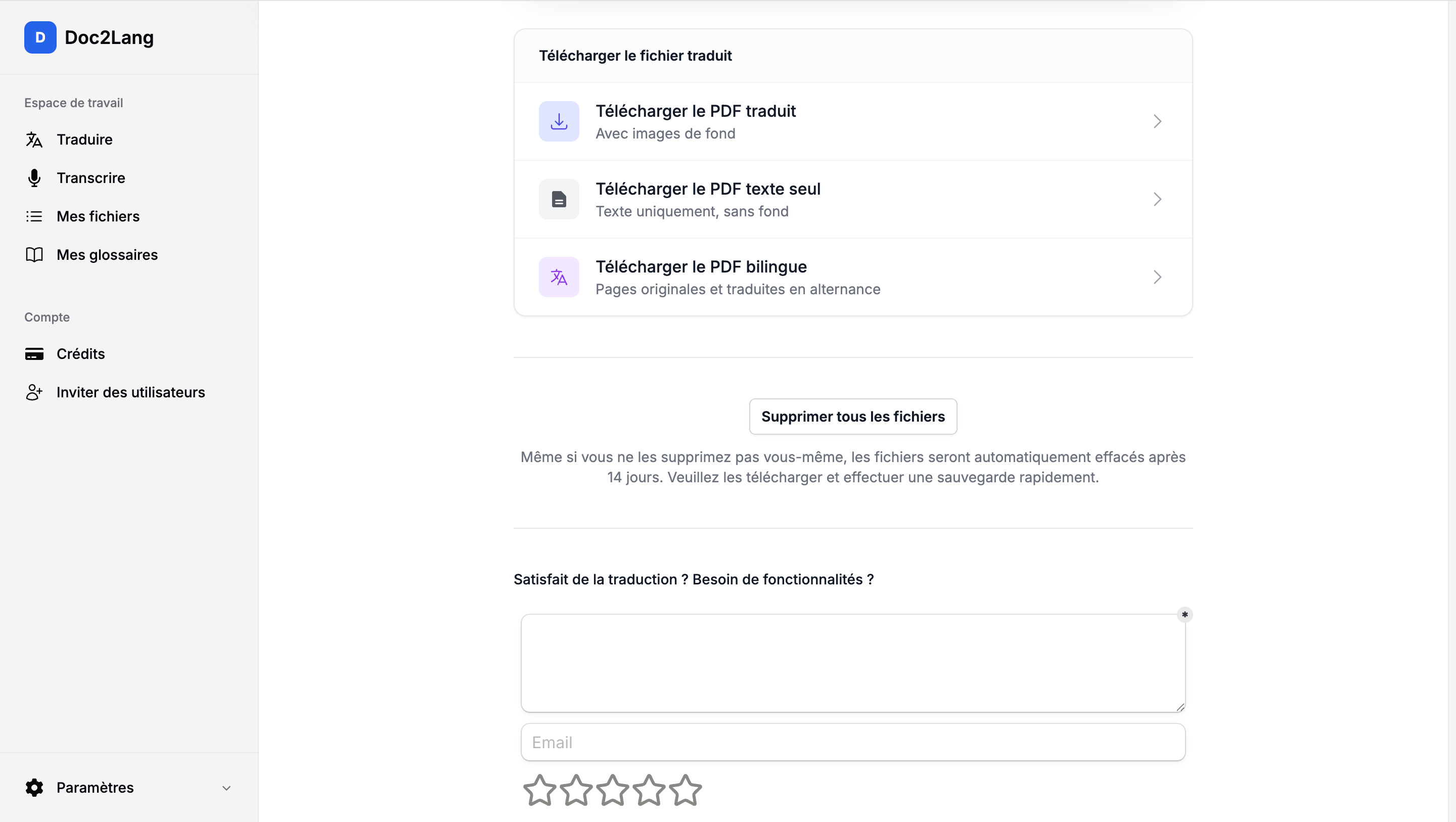
After translation, Doc2Lang offered three outputs: a formatted PDF with backgrounds, a text-only PDF, and a bilingual PDF with alternating original and translated pages. The screen also stated that files are automatically deleted after 14 days, with a manual delete control available sooner.
Pros: strong observed layout retention; bilingual output; terminology control; OCR support; preview before payment; per-file pricing.
Cons: the full output is paid; image-embedded chart labels need checking; the price varies by file and model.
Best for: professional reports, academic papers, and other PDFs where page correspondence matters.
2. Google Translate: best completely free PDF translator
Google Translate is the simplest answer when “free PDF translator” means a complete document translation without creating an account. In the browser, open the Documents tab, choose the languages, upload the file, and download the result.
Google's official document translation help sets a 10 MB limit and a maximum of 300 PDF pages. It also states that document translation is unavailable on smaller screens and that text inside images or scanned PDF pages can appear in the output without being translated.
That makes Google useful for a fast reading copy of a straightforward, born-digital PDF. It is a weak choice for scanned documents, controlled terminology, complex publishing layouts, or a file that must be ready to distribute without manual inspection.
Pros: completely free; no sign-up; fast; generous page limit.
Cons: scanned text is not translated; limited control over terms and layout; desktop-oriented workflow.
Best for: quickly understanding a simple text PDF at no cost.
3. DeepL: best for fluent document translation
To use DeepL to translate PDF files, upload the document through its file translator. The workflow is built around translating a complete document while retaining its format. It requires a DeepL account and supports glossary and document-review features on eligible plans. Some plans can download translated PDFs as DOCX, which is useful when the next step is editing rather than final PDF delivery.
According to DeepL's official file-limit table, a free DeepL account accepts a PDF up to 5 MB and 100,000 characters. Higher plans raise the limits. DeepL also warns in its PDF guidance that OCR and conversion quality can affect the result, so scanned or unusually formatted files still need page-by-page checking.
Pros: document workflow; glossary options; editable output on eligible plans.
Cons: account required; free limits are lower than Google's; formatting can shift as translated text expands; OCR conversion can introduce errors.
Best for: users who prioritize natural prose and can review or edit the output.
4. Adobe Acrobat: best for translating and editing in one workflow
The Adobe PDF translator starts in Acrobat and opens the document in Adobe Express. You can translate all pages, the current page, or selected text, choose a formal or informal tone, preview the translation, edit it, and export a PDF.
Adobe's official PDF translation instructions warn that translation may be skipped for scanned, secured, large, or complex PDFs, and for unsupported fonts or languages. That caveat matters: Acrobat has OCR tools elsewhere in the product, but the translation command should not be assumed to process every scan automatically.
Pros: strong editing environment; page or selection controls; PDF export; familiar workflow for Acrobat users.
Cons: Adobe sign-in and plan access; complex or scanned files can be skipped; not the fastest option for a one-off free translation.
Best for: teams already using Acrobat or Adobe Express that want to edit the translated design.
5. Canva PDF Translator: best for designed documents
The Canva PDF translator imports a PDF as an editable design and can place translated text on duplicate pages or replace the original pages. That makes it especially useful for brochures, one-pagers, and presentations where a designer will adjust fonts, spacing, and images after translation.
Canva's official PDF translator page says the Translate app supports 134 languages, offers one free use, and lets users edit the translated PDF. Its page also describes translation of up to 50 pages for free in the broader document workflow. Because the exact allowance can depend on the workflow and account, check the limit displayed in your editor before committing a long file.
Pros: easy visual editing; duplicate-page comparison; one free use; useful collaboration features.
Cons: sign-up required; long technical papers are not its core use case; image-only text may need a separate recognition step.
Best for: brochures and visual PDFs that will be manually polished after translation.
6. ChatGPT: best for interactive PDF translation and analysis
ChatGPT can accept PDFs, translate selected sections, explain terminology, summarize arguments, and revise a translation in response to instructions. This conversational control is its main advantage over a fixed “upload and download” translator.
OpenAI lists PDF among ChatGPT's supported file types. However, a PDF upload is not the same as a layout-preserving translation pipeline. A generated document may be reconstructed with different fonts, page breaks, columns, and table geometry, so compare every page with the source before using it as a replacement file.
There is also a major scanned-PDF qualification: OpenAI's PDF visual retrieval documentation says interpretation of visuals embedded in PDFs is available only to ChatGPT Enterprise. Other plans can process extracted text, but should not be treated as a dependable OCR workflow for image-only PDFs.
Pros: interactive instructions; strong context and rewriting; useful for questions, summaries, and terminology discussion.
Cons: layout is usually recreated rather than preserved; outputs can omit or paraphrase content if the prompt is loose; embedded PDF visual retrieval is Enterprise-only.
Best for: understanding and revising a PDF when exact page fidelity is secondary.
Best free PDF translator
For a completely free PDF translation, Google Translate is the clearest option in this group. It can translate and download an eligible document without an account, but only works well when the PDF already contains selectable text.
If you need a PDF translator free of charge and without sign-up, start with Google—but do not use it for an image-only scan.
The other “free” offers are different:
- DeepL: a free account allowance, currently 5 MB and 100,000 characters per PDF.
- Canva: one free use of its translation feature; the displayed allowance can depend on the workflow.
- ChatGPT: file uploads can be available on free access, but usage and output capabilities are limited.
- Doc2Lang: a free translation preview and quote; the complete file is paid.
- Adobe Acrobat: access depends on the Adobe plan and current entitlement.
If you search for “translate PDF free,” decide first whether you need to read the content or deliver the translated file. Google is often enough for reading. A professional PDF that must keep its design usually requires either paid processing or manual layout work.
Best AI PDF translator
An AI PDF translator should do more than replace isolated sentences. It should use nearby headings, captions, definitions, and repeated terminology as context. That is especially important for acronyms, product names, legal terms, and academic concepts.
Doc2Lang exposes terminology before the final translation and returns a formatted file. DeepL provides document translation and glossary features. ChatGPT provides the most flexible conversational instructions, but also the greatest risk of paraphrasing, omitting, or restructuring content when the prompt is underspecified.
For any AI tool:
- define the source and target language explicitly;
- state whether names, formulas, citations, and units must remain unchanged;
- provide an approved glossary;
- compare paragraph counts, tables, and footnotes with the source;
- review high-risk numbers and obligations manually.
AI fluency is not proof of completeness. A polished sentence can still contain a wrong number, missing qualifier, or inconsistent term.
Best PDF translator for preserving formatting
To translate a PDF and keep formatting, inspect four things independently:
- Tables: cells, borders, captions, and row alignment;
- Images and charts: position, size, captions, legends, and embedded labels;
- Fonts and text boxes: overflow, substitution, line spacing, and clipping;
- Page breaks: headings, footnotes, and references staying on the correct page.
In the Doc2Lang result we recorded, the translated pages retained close correspondence with the source pages. The bilingual output made visual checking easier because each French page followed its English source page.
DeepL is designed to retain document formatting, while Adobe and Canva are attractive when you are willing to repair the design manually. ChatGPT may produce a clean new document, but that is different from preserving the original coordinates. Google should be treated as a reading-copy tool for complex layouts.
For a deeper explanation of why PDF text moves during translation, see how to translate a PDF without breaking its layout.
Best translator for scanned PDFs
A scanned PDF contains page images instead of a reliable text layer. Translation therefore starts with OCR. Poor OCR turns names, decimal points, footnotes, and punctuation into translation errors before the language model even begins.
If you need to translate a scanned PDF, first confirm that the service creates a searchable text layer and lets you inspect recognition errors before translation.
For a fair scanned-PDF test, use a separate scan with a verified transcript and record:
- character or word error count;
- whether the output becomes searchable;
- missed regions and incorrect reading order;
- tables, handwriting, stamps, and low-contrast text;
- whether the translated PDF still matches the page image.
Doc2Lang and DeepL provide workflows that can process PDFs with OCR considerations, but the recognized text must still be checked. Adobe's translation instructions warn that scanned PDFs may be skipped. Google explicitly leaves scanned text untranslated. ChatGPT's embedded-PDF visual retrieval is restricted to Enterprise, so other plans should not be presented as a general scanned PDF translator.
Google Translate vs DeepL vs Adobe vs ChatGPT
| Question | DeepL | Adobe | ChatGPT | |
|---|---|---|---|---|
| Complete free document? | Yes, within limits | Free account limits | Plan-dependent | Usage-dependent |
| Best strength | No sign-up for document translation | Document and glossary workflow | Post-translation editing | Interactive instructions |
| Main limitation | No scanned-text translation | Account and file limits | May skip complex scans | Does not preserve exact layout |
| Best use | Quick reading copy | Natural editable translation | Designed PDF editing | Analysis and rewriting |
This brand comparison is about workflow and documented limits, not a claim that all four produced identical test files. Test your own PDF before relying on any provider for publication, compliance, or customer delivery.
Which PDF translator should you choose?
The best tool to translate a PDF is the one that matches the output you actually need. The best PDF translator online for a quick reading copy is not necessarily the right service for a scanned contract or a publication-ready report.
- A simple PDF you want to read for free: Google Translate.
- A professional PDF that must keep its layout: Doc2Lang; inspect the free preview before paying.
- A scanned PDF: start with an OCR-capable workflow and verify recognition before judging the translation.
- An academic paper: Doc2Lang for bilingual page checking, DeepL for fluent reading, or ChatGPT for questions and explanations. See the dedicated paper translator.
- A brochure or designed handout: Canva when you want to edit the visual design after translation.
- A PDF already in an Adobe workflow: Acrobat for translation plus manual correction.
- Occasional use: Google for free reading or Doc2Lang for per-file formatted output.
- Repeated business use: compare glossary support, reviewer workflow, retention controls, and total monthly cost—not just the headline price.
Preview a layout-preserving PDF translation
Upload your own PDF, review the translation and exact quote, then decide whether to purchase the complete file.
Frequently asked questions
What is the best PDF translator?
Google Translate is best for a quick free reading copy, DeepL for fluent document translation, ChatGPT for interactive analysis, Adobe or Canva for editing, and Doc2Lang when preserving the original PDF layout is the priority.
Is there a completely free PDF translator?
Google Translate can translate and download eligible text-based PDFs for free without sign-up. Its official limit is 10 MB and 300 PDF pages, and it does not translate text inside scanned pages.
How can I translate a PDF without losing formatting?
Use a tool that places translated text back into the original page regions, then compare tables, images, fonts, footnotes, and page breaks. Doc2Lang retained those elements in our recorded English-to-French paper test.
Can Google Translate translate a scanned PDF?
No. Google states that text in images and scanned PDF pages may appear in the output but is not translated.
Can ChatGPT translate a PDF?
Yes, ChatGPT supports PDF uploads and can translate extracted text. Exact layout preservation is not guaranteed, and OpenAI currently limits interpretation of visuals embedded in PDFs to ChatGPT Enterprise.
Is DeepL or Adobe better for PDF translation?
Choose DeepL when fluent document translation is the priority. Choose Adobe when you already work in Acrobat or Adobe Express and want to edit the translated design before exporting it.
Last updated July 21, 2026. Product limits, pricing, and plan access can change. We publish only the Doc2Lang screenshots recorded for this article; no source or translated PDF is offered for download.